How to Rank Higher on Google Maps and Dominate Local Search
If you've ever wondered why some businesses pop up in the Google Maps 'local pack' and others don't, it's not down to luck. It's strategy. Getting your business to rank higher on Google Maps really boils down to three core principles: a meticulously optimised Google Business Profile (GBP), absolute consistency in your business information across the web, and a stellar online reputation backed by genuine customer reviews.
Your Blueprint for Dominating Google Maps
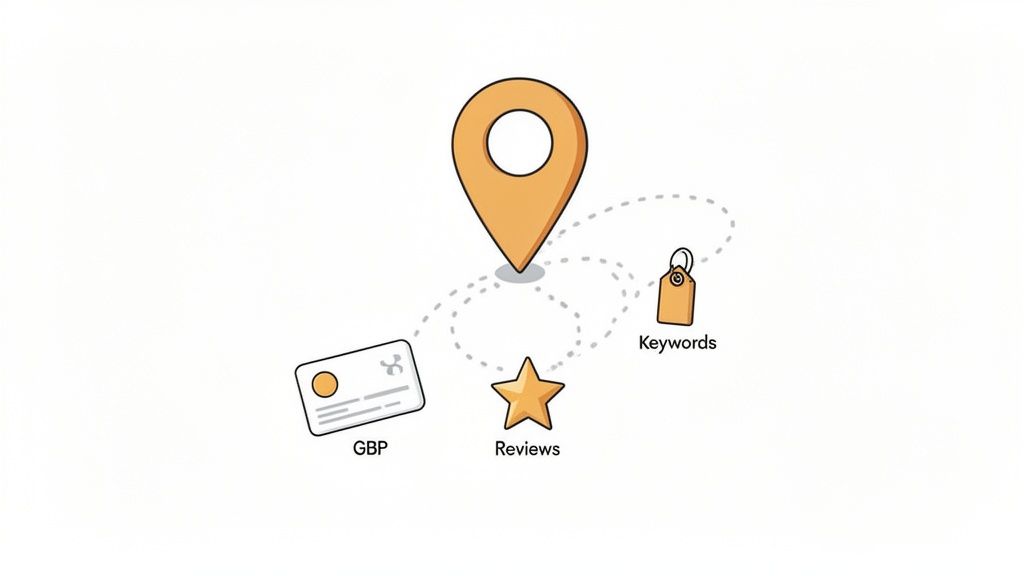
For any local business—whether you run a cafe, a boutique shop, or a plumbing service—cracking the code to Google Maps is how you get found. Stop thinking of your Google Business Profile as just another listing. It's your digital shopfront, and for many people, it's the very first impression they'll have of your brand.
This guide will demystify the process, breaking down local SEO into simple, practical steps. We'll start with the big picture of what makes the algorithm tick before getting into the nitty-gritty tactics. Consider this your roadmap to the top of the local search results.
The Three Pillars of Google Maps Rankings
To really move the needle, you need to focus your efforts across three critical areas. If you let one of them slide, it can seriously weaken all your other hard work.
- Relevance: How closely does your profile align with what someone is searching for? This comes down to the business categories you've chosen, the services you've listed, and even the keywords you use in your profile.
- Distance: This one is pretty self-explanatory—how far is your business from the searcher's location? You can't move your shop, but you can make sure your service areas are perfectly defined to attract the right local customers.
- Prominence: In short, how well-known is your business? Google gauges this by looking at your review count and average rating, the number of times your business is mentioned online (citations), and your website's overall authority.
A complete and active Google Business Profile is the single most important factor for ranking in the local pack. I've seen it time and again: profiles with more reviews, frequent posts, and high-quality photos consistently outperform neglected ones.
Building Your Strategic Foundation
Before we dive into the tactical side of things, let's get one thing straight: consistency is everything. Your business name, address, and phone number (often called 'NAP') must be identical everywhere they appear online. It sounds trivial, but even a tiny difference, like using "St." on your GBP and "Street" on your website, can sow confusion and damage your visibility.
This guide is designed to take you from theory to action. We'll walk through everything from performing a thorough audit of your current setup to building powerful social proof with a smart review strategy. Effective Google Business Profile management isn't a one-off task; it requires a structured, ongoing approach, which is exactly what we'll lay out. We’ll also touch on how modern tools can help you manage these tasks, turning a complex process into a simple, repeatable workflow that drives real growth.
Kicking Things Off: Your Foundational Google Business Profile Audit
Before you even think about climbing the Google Maps rankings, you’ve got to know exactly where you’re starting from. An audit isn't just a box-ticking exercise; it’s about finding those tiny, almost invisible inconsistencies and missed chances that are secretly holding you back.
Think of it this way: you wouldn't build an extension without first checking the foundations. A lot of businesses set up their profile and then forget all about it, not realising that stale or wrong information is actively damaging their visibility.
Getting Your Core Business Information Spot-On
Let's start with the absolute basics. The most crucial part of your audit is making sure your core business details—what we in the industry call NAP (Name, Address, and Phone Number)—are perfect. And I mean perfect. They need to be identical everywhere your business is mentioned online.
Why? Because Google is all about trust. Consistency across the web is one of the strongest signals you can send that your business is legitimate and reliable.
Even a tiny difference can throw a spanner in the works. If your GBP says "Main St." but your website has "Main Street," Google's algorithm can get confused and see them as two separate things, which completely dilutes your ranking power.
Here’s what you need to scrutinise:
- Business Name: Is it your actual, real-world business name? Don't be tempted to stuff keywords in there like "Clapham Plumbing & Heating – Best London Plumber". That's a classic mistake that violates Google's guidelines and could get your profile suspended.
- Address: Check that the address and the map pin are precise. If customers are always calling because they can't find you, your pin is probably slightly off. For service-area businesses, make sure you've defined your service areas correctly.
- Phone Number: Always use a local number with the correct area code. It reinforces your local credentials and is much preferred over a generic, impersonal 0800 number.
Key Takeaway: You'd be amazed what an audit can uncover. I once worked with a café whose Google Maps pin was dropped in the middle of the road outside their shop. Just by dragging it back onto the building, we saw a significant jump in "directions" requests within two weeks.
Digging Deeper: Profile Completeness and Quality
Once your NAP is flawless, it's time to look at the rest of your profile. A complete, information-rich profile doesn't just help potential customers; it gives Google a ton of context about what you do, which is essential for ranking higher on Google Maps.
First up, your business hours. Are they right for every single day? Have you added special hours for the next bank holiday? Nothing puts a customer off faster than that little "hours might differ" warning from Google.
Next, get into your visual and interactive content. This is where you bring your business to life.
- Photos: Are your images high-quality and up-to-date? A profile with just the default Street View image looks abandoned. Get some great shots of your storefront, the inside, your team, and your products or services in action.
- Q&A Section: Have you answered all the questions people have asked? Be proactive here. Add your own frequently asked questions to clear up common queries before anyone even has to ask.
- Reviews: Take a hard look at your reviews. What's your average rating? More importantly, are you replying to them? Engaging with both the good and the bad shows Google (and customers) that you actually care.
All these pieces of the puzzle work together to build a powerful, comprehensive picture of your business. This is the very information Google uses to match you with what people are searching for locally. Strong, consistent mentions across other websites are also a huge factor, and you can learn more about what local citations are and why they matter in our detailed guide.
To help you stay on track, I've put together a quick checklist covering the most critical points.
GBP Audit Checklist: Critical Optimisation Points
Use this checklist to audit your Google Business Profile, focusing on the key areas that directly influence your local search ranking.
| Audit Area | What to Check | Why It Matters for Ranking |
|---|---|---|
| Core NAP | Is the Name, Address, and Phone number 100% identical to your website and citations? | Consistency builds trust with Google's algorithm. Inconsistencies create confusion and dilute ranking signals. |
| Business Name | Does it match your real-world signage? Free of extra keywords? | Keyword stuffing is a policy violation and can lead to penalties or profile suspension. |
| Categories | Is the primary category the best fit? Are relevant secondary categories used? | This is a primary ranking factor. The wrong category means you won't show up for relevant searches. |
| Address & Pin | Is the map pin placed precisely on your entrance? Is the address accurate? | An accurate pin improves user experience (directions) and confirms your physical location for Google. |
| Business Hours | Are standard and special/holiday hours completely up to date? | Incorrect hours lead to poor customer experiences and can result in negative reviews. |
| Photos & Videos | Are there at least 10-15 high-quality, recent images and a video if possible? | Visuals increase engagement and time-on-profile, which are positive signals to Google. |
| Reviews & Responses | Is there a steady stream of new reviews? Are you responding to most (good & bad)? | Review quantity, velocity, and owner responses are major ranking factors that signal a healthy, active business. |
| Q&A Section | Are all user questions answered? Have you pre-populated it with common FAQs? | Shows engagement and provides valuable information, positioning you as an authority. |
Running through this checklist gives you a solid, actionable plan. It turns a vague goal of "ranking higher" into a series of clear steps you can take right now to make a real difference.
Choosing Categories and Keywords That Actually Convert
Your Google Business Profile categories are one of the most powerful levers you can pull to rank higher on Google Maps. Seriously. This isn't just a box to tick; it's the main way you tell Google what your business is. Get this wrong, and you might as well be invisible to your ideal customers.
Think of your primary category as your business's headline. It needs to be the single most accurate description of your core service. If you're a plumber who specialises in emergency call-outs, choosing "Plumber" is non-negotiable. Don't try to be clever with a less common category—it will only confuse the algorithm and bury your profile.
The Make-or-Break Power of Your Primary Category
This one choice carries an incredible amount of weight. In fact, many in the SEO world see it as the most significant individual ranking factor within your Google Business Profile. For businesses here in the UK, getting this right can genuinely skyrocket your visibility in local searches.
Did you know that your primary GBP category is the number one factor influencing your position in the Local Pack and Maps results? It accounts for a massive chunk of the 32% weight given to Google Business Profile signals overall. You can dig into more insights from the 2026 Local Search Ranking Factors survey.
This data really hammers home a simple truth: if you want to rank higher on Google Maps, your primary category must perfectly match what your local customers are actually searching for.
Expanding Your Reach with Secondary Categories
Once you've locked in your primary category, you can start adding secondary categories to cast a wider net for relevant searches. Think of these as your supporting acts. They don't have the same ranking power as your main choice, but they add crucial context for Google.
Let’s go back to our emergency plumber. While "Plumber" is their headline act, they could add secondary categories like:
- Boiler supplier
- Gas engineer
- Central heating engineer
This tells Google that while their main game is plumbing, they're also a solid choice for searches related to boilers and heating systems. A local café, on the other hand, might choose "Café" as their primary category, but then add "Coffee shop," "Sandwich shop," and "Breakfast restaurant" to show up for a broader range of foodie searches. The key is to keep it relevant; don't just add categories for services you don't actually offer. It never works out well.
Weaving Keywords into Your Profile Naturally
Beyond categories, keywords are how you signal your specific expertise. This is not about spamming your business name with keywords—a fast-track to getting your profile suspended. Instead, it’s about integrating them naturally where they belong.
Your business description is a prime piece of real estate for this. It's your chance to tell your story and mention what you do best. Instead of a bland "We are a plumbing company," you can write something far more compelling. Our guide on crafting the perfect Google Business Description takes a deep dive into writing copy that not only sounds great but is also rich in the keywords that attract customers.
For instance, a plumber in Manchester could naturally include phrases like "emergency boiler repair in Manchester," "blocked drain clearance," and "central heating installation."
Using Services and Q&A for Keyword Depth
Your profile's "Services" section is another goldmine for optimisation. Don't just list "Plumbing." You need to break it down into the specific, searchable services your customers are actually looking for.
- Bad Example: Plumbing Services
- Good Example:
- Leaky Pipe Repair
- Tap Installation
- Toilet Unblocking
- Radiator Maintenance
- Bathroom Fitting
Every one of these is a keyword a potential customer might type into Google. By listing them out, you're directly telling the algorithm you offer these exact solutions, making it far more likely you'll rank when someone searches for them.
Finally, don't sleep on the Questions & Answers (Q&A) section. It's an often-overlooked opportunity. You can (and should) proactively add your own common questions and answer them yourself. This lets you control the narrative and naturally include important keywords. For example, you could ask, "Do you offer 24-hour emergency plumbing in South London?" and then answer it with helpful details about your services. This approach not only informs customers but also reinforces your relevance for those crucial, high-intent search terms.
Nailing Your Review Strategy to Build Social Proof
Think of customer reviews as the modern-day version of word-of-mouth. They’re a huge signal to Google that your business is legitimate, active, and valued by the community. When you're weighing up two local pubs for a Sunday roast, what’s the first thing you do? You check the star ratings and see what people are saying. Your potential customers are doing exactly the same.
A steady flow of positive, genuine feedback provides powerful social proof. It tells both Google and new customers that you’re a safe bet. In my experience, businesses that consistently get good reviews almost always see that reflected in their Google Maps rankings. It's a clear sign of a healthy, customer-focused operation.
Of course, this doesn't just happen on its own. You need a solid plan to encourage that feedback.
How to Actually Get More Reviews
Just crossing your fingers and hoping for the best isn't a strategy. The most effective way to build up your reviews is to ask for them, but you have to make it dead simple for your customers. No one has the time or patience to jump through hoops just to leave a comment.
The golden rule? Ask right after a positive experience, when the customer is feeling happiest. This could be the moment a service is completed, after they’ve enjoyed a great meal, or when they’ve just made a purchase they’re excited about.
Here are a few low-effort methods that work like a charm:
- Email & SMS Requests: A day or two after a transaction, send a quick follow-up message. Keep it short and sweet, and most importantly, include a direct link to your Google review page. A simple, "Hi Jane, enjoying your new boiler? We'd love it if you could share your experience with us!" is all it takes.
- QR Codes: These are brilliant for physical locations. Stick a QR code linking to your review page on receipts, business cards, or a small sign by the till. Customers can scan it with their phone and leave a review right there and then.
- The Personal Touch: For high-value clients or customers you’ve built a rapport with, a personal ask is incredibly powerful. A genuine, "Your feedback would really help our small business grow" often gets a fantastic, detailed response.
A Word of Warning: Never, ever offer incentives or freebies for reviews. It's a direct violation of Google's policies and can get your profile penalised or your reviews removed. The aim is to encourage authentic feedback, not to buy a five-star rating.
Why Responding to Every Single Review is Non-Negotiable
Getting reviews is only half the job. How you respond is just as important for your reputation and your local SEO. Replying to feedback shows you’re engaged and that you value what your customers have to say. For Google, it’s another positive signal that you’re actively managing your profile.
In fact, research shows that businesses that respond to reviews are seen as 1.7 times more trustworthy than those that don't. This isn't just about damage control; it's about actively building trust with every single interaction.
Dealing with the Good and the Bad
Replying to positive reviews is the fun part. A simple thank you is nice, but a great response mentions a specific detail from their comment. It shows you’ve actually read it and makes the customer feel genuinely heard. Instead of a generic "Thanks for your review," try something like, "So glad you enjoyed the steak pie, it's one of our favourites too! We hope to see you again soon."
Negative reviews are tougher, but they're also a massive opportunity. A calm, professional, and helpful response can completely turn a bad situation around and, more importantly, it shows every other potential customer how you handle things when they go wrong.
Here’s a simple framework for tackling negative feedback:
- Acknowledge and Apologise: Always start by thanking them for their feedback and saying sorry that they had a bad experience.
- Show Empathy, Not Excuses: You need to validate their feelings without getting defensive. "We're very sorry to hear the service didn't meet your expectations" works far better than making excuses.
- Take it Offline: Offer a direct contact method, like an email address or phone number, to resolve the issue privately. This demonstrates you're taking it seriously.
- Stay Professional: Never get drawn into a public slanging match. Remember, your reply isn't just for that one person; it's for everyone who will read it in the future.
By consistently gathering and responding to reviews, you create a powerful feedback loop. You get valuable insights to improve your business while building a stellar online reputation that directly fuels your Google Maps rankings.
Keeping Your Profile Fresh with Posts and Photos
A Google Business Profile that just sits there, gathering dust? That's doing you a massive disservice. Think of it like a physical shop window. If the display hasn't changed in months, people will start to wonder if you're still open. Or worse, they'll just stop looking altogether. The same logic applies online.
To get Google Maps to pay attention, you need to show the algorithm that your business is active and relevant right now. This is where Google Posts and a steady stream of fresh photos come in. They aren't just cosmetic touches; they are powerful signals of activity that Google’s ranking system loves to see. A regularly updated profile shouts, "We're here, we're busy, and we're worth showing to people!"
Using Google Posts to Your Advantage
Google Posts are basically free mini-adverts that pop up right on your profile in Search and Maps. They're perfect for catching someone's eye and sharing timely info. Imagine a potential customer weighing up their options; a well-timed post about your current offer could be the exact nudge they need to pick you over the competition.
You've got a few different types of posts to play with, each with its own job:
- Updates: Think of these as your business's micro-blog. Share company news, show off a fantastic new 5-star review, or post a helpful tip that your customers would appreciate. It's all about staying top-of-mind.
- Offers: These are built to drive sales. You can create special promotions with start and end dates, add voucher codes, and even link directly to a page where people can redeem the offer. A local restaurant, for instance, could run a "20% off mains this week" post.
- Events: Hosting a workshop, a special sale, or a community open day? This is the post for you. You can set the date and time, and Google will highlight it on your profile as the event gets closer.
You don't need a complex content plan to make this work. I've seen clients get fantastic results simply by committing to one Google Post per week. It’s the perfect sweet spot—enough to keep your profile fresh and signal activity to Google without becoming a major drain on your time.
Building a Winning Photo and Video Strategy
Let's face it, people are visual. High-quality photos and videos do more than just make your profile look professional; they build trust and give customers a real feel for your business before they've even set foot inside. The data backs this up: profiles with more photos consistently get more clicks and requests for directions.
So, don't just upload a couple of snaps of your storefront and call it a day. A varied and ongoing photo strategy is what you're aiming for.
This is where planning can save you a lot of hassle. Using a platform like LocalHQ, you can schedule and manage your media uploads ahead of time, ensuring your profile stays visually engaging without any last-minute panic.
A dashboard like this helps you map out your content, maintaining a consistent flow of fresh visuals that tell your business’s story.
What kind of photos should you be adding? A good mix is key. Try to include:
- Exterior and Interior Shots: Show people your building from the street and what it looks like inside. No surprises.
- Team Photos: Putting a face to the name makes your business feel so much more human and approachable.
- Products or Services in Action: Are you a baker? Let's see those amazing cakes. A mechanic? Show us your clean, organised workshop.
- Before and After Shots: For businesses like landscapers, decorators, or hairdressers, these are absolute gold. They show real results.
Here’s a pro tip that can give you a small but worthwhile edge: geotag your photos before you upload them. This means embedding the location data (latitude and longitude) directly into the image file. While Google is a bit cagey about how much this officially impacts rankings, many in the SEO world believe it’s another valuable signal that reinforces your business's physical location. It certainly can't hurt your efforts to rank higher on Google Maps.
The main takeaway here is consistency. Make it a habit to add a few new, high-quality photos every single month.
Tracking Performance and Solving Common Ranking Issues
If you don't measure it, you can't improve it. It’s an old saying, but it’s the absolute truth in local SEO. Optimising your profile is a massive first step, but the real growth comes from tracking what’s working, understanding the data, and being ready to tackle the roadblocks that inevitably pop up.
Your first port of call is the "Performance" section right inside your Google Business Profile. This is your command centre. It shows you exactly how people are finding you—whether they searched for your business by name (Direct) or stumbled upon you when looking for a service like "plumber near me" (Discovery).
It also tracks the actions they take once they find you: website clicks, requests for directions, and phone calls. Keep a close eye on these metrics over time. A spike in calls after you post an update about a new service isn't a coincidence; it's a clear signal of what resonates with your customers.
Visualising Your Local Visibility
While the built-in performance data is useful, it doesn't tell you the whole story. Specifically, it won't show you how visible you are block-by-block across your city. This is where a geo-grid rank tracker becomes your secret weapon.
Instead of giving you a single ranking number, a geo-grid shows you where you rank for your most important keywords at multiple points across a map. You get a clear, colour-coded view of your digital territory, instantly showing your strong zones and the areas where competitors are eating your lunch.
This kind of detailed insight is non-negotiable for any business serious about dominating its service area. It moves you from guesswork to a data-backed strategy. We dive deep into this technique in our guide to rank tracking for local keywords.
Troubleshooting Common Ranking Headaches
Even the most meticulously optimised profile can hit a snag. A sudden drop in rankings, a spammy review, or—worst of all—a suspension can be incredibly frustrating. The key is knowing how to react quickly and correctly.
Let's walk through a few common headaches I see all the time.
A sudden ranking drop can feel like a punch to the gut. Before you panic, check the basics. Has any of your core information (name, address, phone number, primary category) been changed without your knowledge? It happens. Also, scan the map for new competitors who’ve just opened up shop nearby or an existing rival who has suddenly started a major push for reviews.
Spammy or fake reviews are another pain. If you get a 1-star review that’s clearly off-topic, from a fake profile, or violates Google's policies, don't just let it sit there. Flag it for removal immediately. While you wait for Google to review it, post a calm, professional public reply. Something as simple as, "We have no record of a customer with this name. Please contact our office directly so we can address your concerns," shows other potential customers that you're proactive.
A profile suspension is the most serious issue you can face. It almost always stems from a violation of Google's guidelines, like keyword-stuffing your business name or using a P.O. Box as your address. The first step is to carefully read the guidelines, identify and fix the violation, and then submit a reinstatement request with evidence that you've corrected the issue.
The most common cause of ranking fluctuations I see is simple inconsistency. A business updates its phone number on its website but forgets about the two dozen online directories it's listed on. Google’s algorithm picks up on this discrepancy, its trust in your data wavers, and your ranking quietly slips.
What Should You Post on Your Profile?
Another challenge is figuring out what to share via Google Posts to keep your profile fresh and engaging. This simple decision tree can help you choose the right type of post based on your goal.
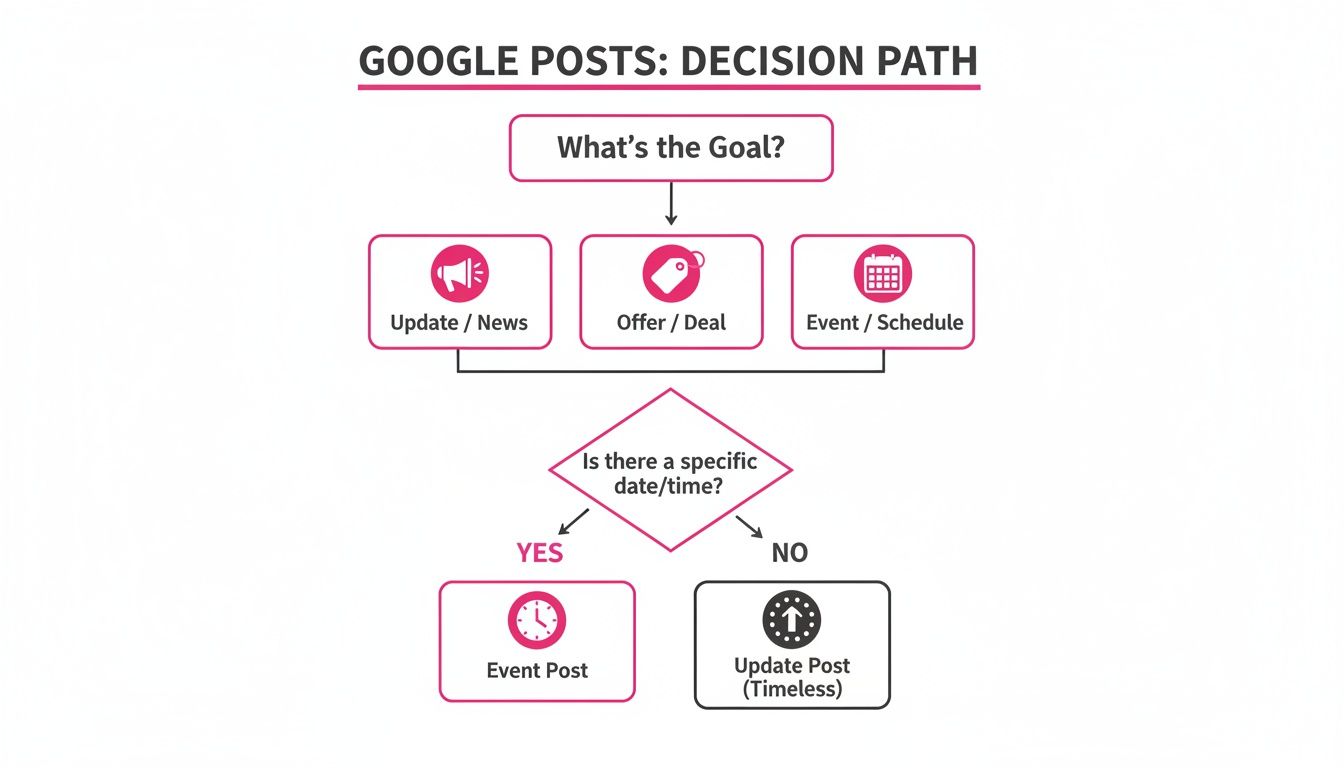
This visual guide strips it down to the basics. If you want to drive immediate sales, run an Offer. Promoting a specific occasion like a webinar or holiday sale? Use an Event. For everything else—company news, blog posts, or service highlights—an Update is your go-to.
To help you diagnose issues even faster, here’s a quick troubleshooting table for some of the most frequent problems that can hurt your visibility.
Common Google Maps Ranking Problems and Solutions
| Common Problem | Potential Cause | How to Fix It |
|---|---|---|
| Rankings suddenly drop | Core information changed (NAP, categories); new, aggressive competitor; negative review bomb; Google algorithm update. | Audit your profile for unauthorised changes. Check your geo-grid report for competitor activity. Review recent reviews and flag any spam. Check industry news for confirmed Google updates. |
| Profile not showing for key services | Incorrect or too-few categories; service not mentioned in your profile description, posts, or on your website. | Ensure your primary category is the best fit. Add relevant secondary categories. Write detailed service descriptions and create Google Posts and website content targeting those keywords. |
| Inconsistent NAP information | Business details are different across the web (citations, directories, social media), confusing Google. | Conduct a full citation audit. Use a tool or manually check top directories (Yelp, Apple Maps, etc.) and correct any outdated or incorrect name, address, or phone number listings. |
| Negative reviews are hurting rank | A low overall star rating or a recent influx of negative feedback can impact trust and visibility. | Respond professionally to all reviews (positive and negative). Proactively ask happy customers for new reviews to improve your average rating and show recent positive sentiment. |
| Profile suspended | Violation of Google's guidelines (e.g., keyword stuffing in name, using a virtual office address, incorrect business model). | Carefully read the Google Business Profile guidelines. Correct the specific violation on your profile. Submit a detailed reinstatement request with proof of compliance. |
By consistently tracking your performance and having a clear plan for troubleshooting, you can navigate the ups and downs of local SEO and work your way to a top spot on Google Maps.
Got Questions About Google Maps SEO? We’ve Got Answers
Even with the best plan, a few questions always pop up. Let's tackle some of the most common ones we hear from businesses trying to climb the Google Maps rankings.
How Long Does It Actually Take to See Results?
This is the big one, isn't it? The honest answer is: it depends.
Some changes, like updating your opening hours or fixing a wrong phone number, can appear almost immediately. You might even see a small bump in a few weeks if you fix a major issue, like switching to a much more accurate primary business category.
But for the kind of lasting results that really move the needle, you need to be patient. Building up a solid base of reviews, earning local links, and consistently engaging with customers is a long game. Realistically, you should start seeing significant, stable improvements in your Google Maps rankings within two to four months of dedicated, consistent effort.
Do I Need a Physical Shopfront to Show Up on the Map?
Not necessarily, but you do need a verifiable address. To get a standard Google Business Profile with a pin on the map, Google needs to be able to send a verification postcard to a real, physical location.
However, what if you're a service-based business, like a plumber or a mobile dog groomer who travels to clients? In that case, you can set up what's called a Service Area Business (SAB) profile. You'll still verify a real address, but you can choose to hide it from the public.
Instead of a pin, you'll define the specific towns, cities, or postcodes you serve. You'll still show up in Google Maps for relevant searches within that service area, just without a public-facing address.
One thing you absolutely must avoid is adding extra keywords to your business name. We often see things like "Smith's Plumbing – Best London Plumber." This is called keyword stuffing, and it's a direct violation of Google's guidelines. It's a risky shortcut that can get your entire profile suspended. Stick to your real, registered business name.
Ready to stop guessing and start ranking? LocalHQ gives you the tools to manage your profile, track your visibility with geo-grids, and automate your review responses—all from one simple dashboard. See how it works at https://localhq.io.