Google Reviews Disappeared: google reviews disappeared Recovery Guide
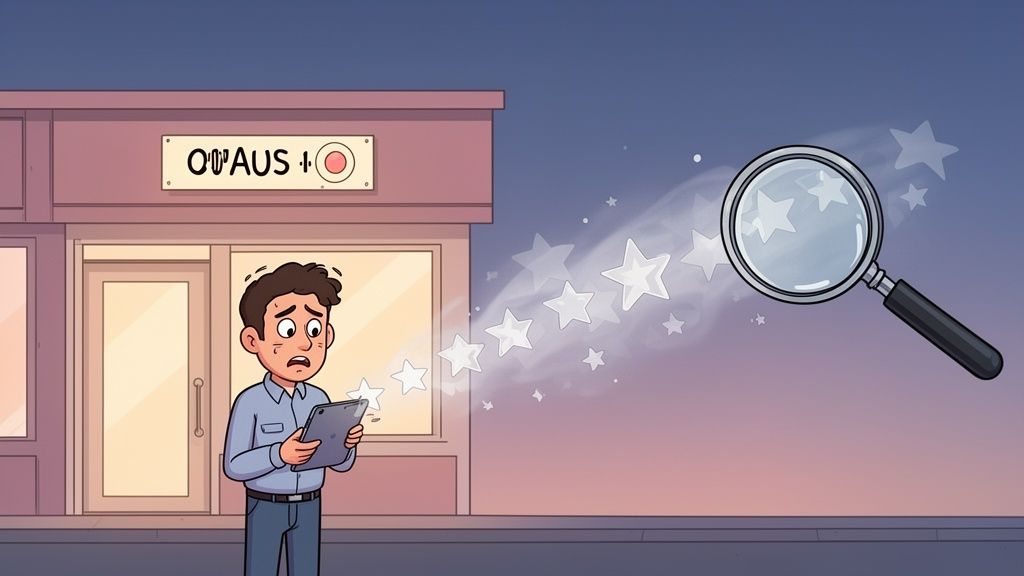
It’s a heart-stopping moment for any business owner. You log into your Google Business Profile, expecting to see that glowing collection of customer feedback you’ve worked so hard to build, and… they’re gone. This isn't just a minor tech hiccup; it's a direct blow to your reputation and how you show up in local searches. Often, the culprit is Google's increasingly aggressive spam filters, but sometimes it’s a simple profile change gone wrong. Either way, you need a clear plan to get them back.
The Sudden Shock of Vanishing Reviews
Finding your Google reviews have disappeared can feel like your digital shopfront has been trashed overnight. One day you have a solid bank of five-star ratings building trust with new customers, and the next, there’s a gaping hole where your credibility used to be. It’s a frustratingly common problem that can hit anyone, from a small local café to a national retail chain.
More often than not, the finger points directly at Google's own automated systems. In its relentless battle against fake reviews, Google uses complex algorithms to sniff out and delete anything that breaks its rules. While essential for keeping the platform trustworthy, these systems can be a bit heavy-handed, sometimes flagging completely genuine reviews by mistake. This can be triggered by something as simple as a sudden surge in positive feedback that looks unnatural to the algorithm, even if it’s just the result of a brilliant marketing campaign.
Why Genuine Feedback Gets Flagged
Think about it from Google's perspective. A local plumber finishes a huge job and gets a dozen glowing reviews from happy clients in a week. To an algorithm, that sudden spike looks suspicious and can trigger an automatic removal. Another classic mistake is offering an in-store tablet for customers to leave feedback. It seems like a great idea, but multiple reviews coming from the same IP address get flagged as a conflict of interest, even with the best intentions.
This exact problem hit countless UK businesses during a massive Google review purge in early 2023. Automated systems went on a rampage, wiping out legitimate positive feedback while trying to target spam networks. Owners watched their review counts plummet as the AI generated 'a large number of false positives'. Google eventually admitted its protections 'took down more than expected policy-abiding reviews,' leaving thousands of businesses scrambling. You can read more about how this event impacted UK businesses and the clean-up that followed.
Key Takeaway: When your reviews vanish, it's rarely a direct penalty against you. More likely, you're just collateral damage in Google's huge, automated war on spam. Realising this is the first step to getting things sorted.
It's an infuriating spot to be in because you’ve done everything right. The praise was real, the customers were delighted, and their experiences were 100% authentic. Yet here you are, left cleaning up after an algorithm's mistake. This is precisely why you need a methodical way to figure out what happened and how to fix it. Without one, you're just shooting in the dark.
Investigating Why Your Reviews Are Gone
That sinking feeling when you see your hard-earned Google reviews have vanished is something no business owner wants to experience. The first instinct is usually to panic, but before you rush off to contact Google, it's time to play detective. Methodically figuring out the why is your best first step towards getting them back.
Let's start with the basics. First, check the email address connected to your Google Business Profile. While Google won't ping you for every single review removal, they will definitely let you know about major problems, like a profile suspension, which would make all your reviews disappear. Also, pop into your GBP dashboard and scan for any red-flag notifications at the top.
Auditing Recent Profile Changes
Now, think back. Have you changed anything on your profile recently? It’s surprising how often a small, innocent update can accidentally trip Google's algorithm or trigger a re-verification, causing reviews to temporarily drop off. This happens to small businesses all the time.
Here are some of the most common culprits I've seen over the years:
- Address or Service Area Updates: Shifting your physical address or tweaking your service area is a big deal to Google. This often kicks off a new verification process, and reviews can go into hiding while it happens.
- Phone Number or Website Changes: Swapping out core contact details can also make the system pause and re-confirm things, affecting what's displayed.
- Business Category Edits: Adding or changing your business categories can sometimes have weird side effects, especially if you make a drastic change.
- Ownership or User Changes: If you've just handed over the keys to a new owner or added managers to the profile, don't be surprised if there's a temporary hiccup with your data, including reviews.
If you made one of these tweaks just before the reviews went missing, you’ve probably found your culprit. While this disruption is often temporary, knowing the cause is crucial. This level of detailed auditing is a core part of effective Google Business Profile management and keeps you in the driver's seat.
This flowchart is a great way to visualise the troubleshooting process when your reviews go walkabout.
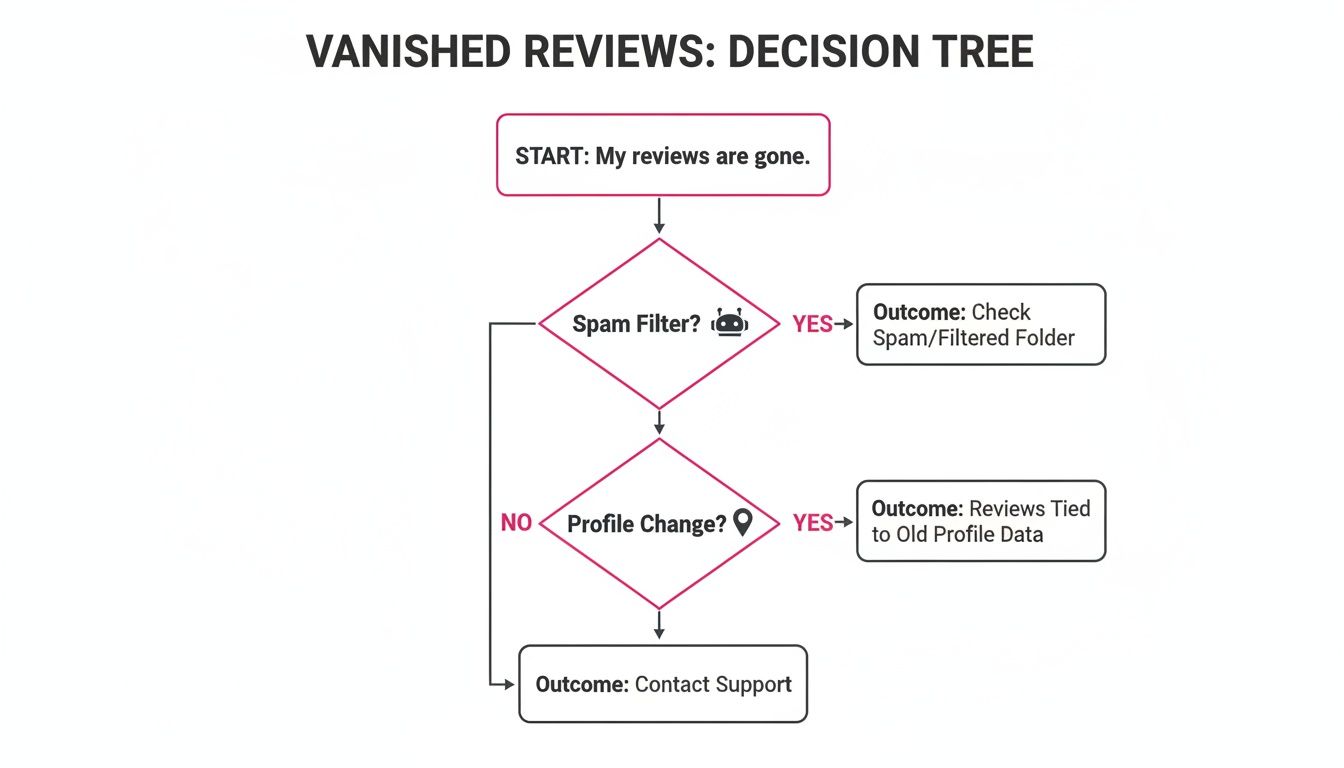
It gives you a simple path to follow: check for common issues like spam filters or profile changes before you need to escalate the problem to Google's support team.
Differentiating Glitches from Removals
It’s also important to work out if you're dealing with a temporary platform glitch or a more permanent removal. Every now and then, Google's system has a wobble that can affect review counts across the board. A quick search on X (formerly Twitter) or digital marketing forums will usually tell you if other businesses are shouting about the same problem.
Pro Tip: A widespread glitch is actually the best-case scenario. If lots of others are affected, it means Google is almost certainly aware and working on a fix. Your reviews will likely just reappear on their own.
However, if your detective work points to an issue specific to your profile, the problem might be more serious. Maybe a recent marketing campaign brought in a sudden flood of five-star reviews, which the algorithm flagged as spam. That could trigger a removal.
By carefully ruling out the possibilities—checking for notifications, auditing your recent changes, and sniffing out any wider glitches—you start building a case. With this information in hand, you can approach Google support with a clear, concise report, which dramatically improves your chances of getting those valuable reviews reinstated.
What Makes Google Reviews Vanish Into Thin Air?
It’s one of the most frustrating things for any business owner: you earn a fantastic review from a happy customer, and then one day, it’s just… gone. To get to the bottom of it, you need to think like Google. Its automated systems are always on patrol, looking for anything that breaks its rules, and sometimes, perfectly legitimate feedback gets caught in the net.
Think of Google’s algorithm as a bouncer with a very strict, non-negotiable list of rules. It doesn't care about your good intentions; it only sees patterns. If something looks even slightly suspicious, it gets flagged and removed. This is often why a genuine, glowing review can disappear without a trace.
Common (But Easily Overlooked) Policy Breaches
Most of the time, reviews disappear because of simple mistakes that seem harmless but technically breach Google's terms. Getting your head around these common slip-ups is the first step to avoiding them.
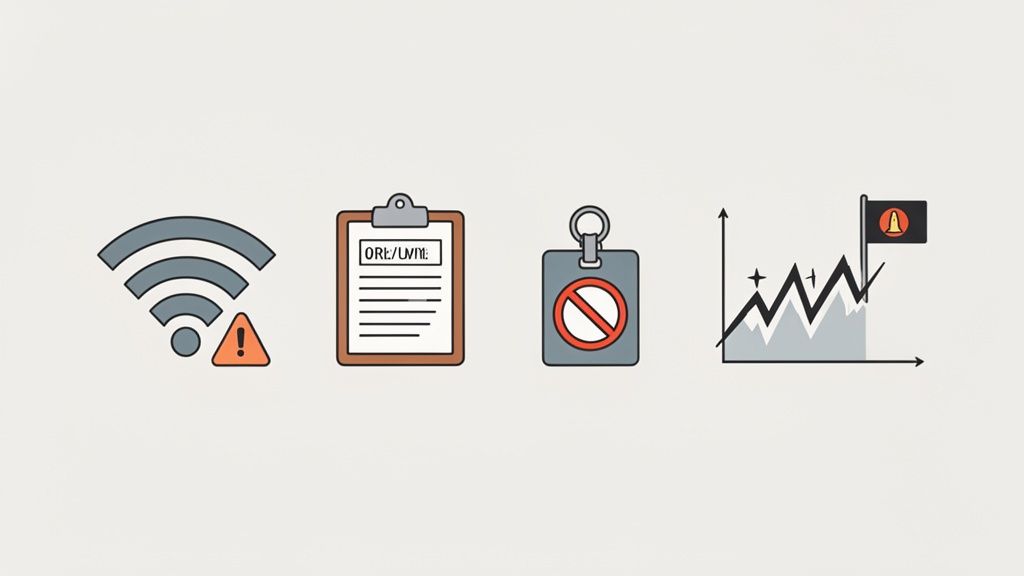
A huge one is conflict of interest. This is a much broader category than most people realise and covers a few key scenarios:
- Reviews from Employees: It’s a hard no. Current or even former staff leaving reviews is seen as biased and will almost always be removed.
- Reviews From Your Business Wi-Fi: If a customer uses your guest Wi-Fi to post a review right after a great experience, Google can flag it. Multiple reviews coming from the same IP address look like a classic manipulation tactic.
- Using an In-House Tablet or Kiosk: We see this all the time. A tradesperson finishes a job, hands the client their company tablet, and asks for a review. While the intention is good, it creates the same IP address red flag and can get a whole batch of honest reviews wiped out.
These actions, though innocent, look just like the patterns used by people trying to cheat the system, triggering an automatic removal.
Here's a real-world example: A dental practice in Manchester set up an iPad at reception for patients to leave feedback. They quickly gathered over 20 five-star reviews, but were horrified when they all vanished. The cause? Every single one came from the practice's own IP address, which set off Google's spam filters.
Another common reason is prohibited content. This isn’t just about swearing or hate speech. A review can be removed for including promotional content like a website link, an email address, or a phone number. This effectively turns the review into an advert, which is against the rules.
The Sneaky Triggers That Catch Most Businesses Out
Beyond the obvious stuff, there are more subtle patterns that can get your reviews removed. These are often the hardest to figure out because they’re all about user behaviour and the speed at which you get reviews.
One of the biggest red flags for Google is an unnatural review velocity. If your profile has been quietly collecting a couple of reviews a month and then suddenly gets 30 five-star ratings in two days, the algorithm is going to get suspicious. That kind of spike looks a lot like you've bought fake reviews or are "review gating"—only asking your happiest customers for feedback.
This has become a major issue in the UK, especially since the Competition and Markets Authority (CMA) put pressure on Google to crack down on fake reviews. In response, Google ramped up its deletion efforts, and a lot of UK businesses saw legitimate five-star reviews get caught in the dragnet. Data showed a massive spike in removals. You can actually learn more about the impact of these legal takedowns on businesses.
The reviewer's own Google account history also matters. Let’s say a customer leaves you a wonderful, detailed review. If their account has a history of leaving spammy comments on other business profiles, their feedback for you is at risk. Their low "trust score" can tarnish your profile by association. It’s completely out of your hands, but it’s a key reason why a perfectly good review might suddenly disappear.
Once you understand these triggers—from the obvious to the obscure—you're in a much better position to protect your online reputation. It’s all about playing by Google's rules, even when they seem a bit harsh.
Your Action Plan for Getting Missing Reviews Back
Seeing your hard-earned Google reviews vanish is a shock, there's no doubt about it. But the key now is to stay calm and work through the problem methodically. Once you have a good hunch about what triggered the removal, you can start the recovery process. This isn't about firing off an angry email; it's about building a clear, evidence-based case for the Google Business Profile support team.
Your main goal is to make it incredibly easy for a support agent to understand your situation, look into the issue, and hopefully, bring your legitimate reviews back online. Having all your ducks in a row before you even start is the single best thing you can do to boost your chances of success.
Getting in Touch with Google Business Profile Support
The first official step is to log a support ticket through the right channel. Let's be honest, navigating Google's help centre can feel like you're lost in a maze. It’s crucial to find the specific form for missing reviews to avoid your request getting bounced around or delayed.
You'll want to head over to the Google Business Profile Help Centre. From there, you’ll need to click through a few options to find the contact form related to reviews. Usually, this means selecting your business, picking a topic like "Reviews," and then finding a more specific option like "Missing reviews."
Once you land on the right form, you'll be asked for detailed information about your business and the problem you're facing. Be as thorough as you can here – it really matters.
My Pro Tip: Before you even think about filling out that form, get all your evidence together. Have your Business Profile ID ready, grab any screenshots of the missing reviews if you happen to have them, and jot down the approximate dates they were posted. The more proof you can hand over, the stronger your case will be.
How to Craft the Perfect Support Request
When you write to Google support, keep it professional, concise, and stick to the facts. Leave emotion out of it. A well-structured, logical request helps the support agent grasp the problem quickly and get straight to investigating, rather than having to email you back and forth for more information.
Here’s a quick rundown of the essential details you absolutely must include:
- Your Business Profile ID: This is the unique code for your listing. It's non-negotiable. You can usually find it in your profile's advanced settings.
- The Problem: State clearly that legitimate customer reviews have disappeared from your profile. It helps to mention the approximate number of reviews that have gone missing.
- Specific Examples: If you know which reviews are gone, provide the reviewer's name and the date they posted it. Any screenshots you have are pure gold here.
- A Bit of Context: Briefly explain why you believe the reviews were genuine and were removed by mistake. Something simple like, "These reviews were from long-standing customers following the recent completion of their projects."
This level of detail shows that you're on top of your profile management and have a genuine issue that needs a proper look.
A Professional Template for Your Request
To give you a head start, here’s a template I've used that you can adapt. Just swap out the bracketed information with your own details.
Subject: Missing Legitimate Customer Reviews from Business Profile
Business Name: [Your Business Name]
Business Address: [Your Full Business Address]
Business Profile ID: [Your Business Profile ID]
Dear Google Business Profile Support Team,
I'm writing to report that several genuine customer reviews have recently disappeared from our Google Business Profile. We've noticed that approximately [Number] reviews have been removed over the past [Timeframe, e.g., two weeks].
These reviews are from authentic customers who have used our services. For example, a review from a customer named [Customer's Name], posted on or around [Date], is no longer visible. We believe these were removed in error, possibly caught by an automated filter.
We have carefully reviewed Google's content policies and are confident these reviews did not violate any guidelines.
Could you please investigate this matter for us and help reinstate this valuable customer feedback?
Thank you for your time and assistance.
Sincerely,
[Your Name]
[Your Title]
After you've sent your request, you'll need to be patient. It can take several business days to hear anything back. If your first attempt is denied, you can appeal the decision, but make sure you provide any new evidence or context that might help strengthen your case.
This whole process can be a real time-drain, which is why many businesses use a dedicated review manager to monitor and protect their online reputation. A good system can keep an archive of your reviews, making it much easier to pull up the evidence you need when genuine feedback goes missing.
Building a Resilient Review Strategy for the Future
It’s one thing to claw back reviews after they’ve vanished – that’s a stressful, reactive game nobody wants to play. The real victory is building a proactive strategy that stops your genuine feedback from getting zapped in the first place. This is about shifting your mindset from chasing short-term gains to creating a long-term, sustainable approach that works with Google's guidelines, not against them.
Think of it less as avoiding penalties and more as building a trustworthy online reputation that can weather any storm. When you understand and respect the rules, you create a review profile that withstands Google's algorithm updates and becomes a powerful, reliable asset for your business.
Fostering Authentic Feedback the Right Way
The heart of a bulletproof strategy is encouraging customer feedback in a way that feels natural and is completely above board. Your goal should be a steady, organic flow of reviews over time, not sudden, suspicious downpours that scream "spam" to Google's filters.
From my experience, here are a few simple practices that work wonders:
- Personalised Follow-Ups: Ditch the generic email blasts. Send a personalised message after you’ve finished a job or sold a product. A quick note mentioning the specific service makes the request feel human and genuine.
- Simple, Direct Links: Don't make customers jump through hoops. Use a direct review link – you can generate one in your GBP dashboard – and put it everywhere: on your website, in your email signature, even on receipts.
- Timing is Everything: Ask for a review when the positive experience is still fresh. For a restaurant, that might be the next day. For a plumber, maybe a couple of days after the job is complete and the customer is happy.
One thing you absolutely must avoid is any hint of manipulation. Never, ever offer discounts, gift cards, or any other incentive for a review. That's a direct violation of Google's policy and the fastest way to get your reviews—and possibly your whole profile—penalised.
Real-World Scenario: A local boutique started tucking a small card into every shopping bag with a QR code linking to their review page. The card didn’t offer a discount; it simply said, "Loved your experience? Let us know!" This simple touch resulted in a slow but steady increase of 2-3 new reviews per week—a perfectly natural pace that strengthens their profile without raising any red flags.
The Power of Consistent Monitoring
You can't protect what you aren't watching. If you only realise your "google reviews disappeared" weeks after the fact, the trail has gone cold, and recovery becomes a nightmare. Consistent monitoring is your early warning system. It catches problems the moment they happen, giving you the best shot at a quick resolution.
Make it a non-negotiable part of your weekly routine to check your review count, star rating, and recent feedback. This allows you to spot anomalies instantly. Did your review count drop by five overnight? Knowing this means you can investigate right away instead of finding out a month down the line when it’s too late.
Leveraging Technology for Reputation Management
Let's be realistic: manually tracking every review across multiple locations or platforms is a massive time sink. This is where reputation management software becomes a game-changer, acting as your 24/7 watchdog.
A good platform gives you a central dashboard to:
- Track Review Velocity: See at a glance how many reviews you're getting and how often. This helps you spot unnatural spikes or sudden drops immediately.
- Receive Instant Alerts: Set up notifications to ping you the second a review is removed or your total count changes. This allows for immediate action.
- Archive All Feedback: The best systems keep a secure backup of every review. If a legitimate review gets removed by Google, you have a time-stamped record of the original text and reviewer—invaluable evidence for a reinstatement appeal.
To get the most out of these tools and properly shield your online presence, it can be a huge help to work with specialised AI reputation management consultants. They can help put the right strategies and technology in place.
By combining ethical review generation with vigilant monitoring, you stop putting out fires and start building a strong, defensible online reputation. This resilience is what separates businesses that thrive online from those constantly fighting to stay afloat. It ensures the hard work you put into delighting customers is permanently reflected where it counts.
Got Questions About Missing Google Reviews? We’ve Got Answers.
When your hard-earned reviews suddenly vanish, it’s natural to have a lot of questions. It's a frustrating spot to be in, and frankly, Google’s process isn’t always clear. Let's walk through some of the most common queries we hear from business owners who are trying to make sense of it all.
How Long Will It Take for Google to Bring My Reviews Back?
This is the million-pound question, and unfortunately, there's no single timeline. It really depends on why the reviews disappeared in the first place.
If it was a widespread technical glitch on Google's end—something they've acknowledged publicly—you might see your reviews pop back up on their own within a couple of weeks. In those cases, you often don't have to lift a finger.
However, if you're dealing with a problem specific to your profile and you've had to file a support ticket, it's a different story. You can usually expect an initial reply from the support team within two to five business days. But the actual investigation and getting the reviews back? That can take anywhere from a few more days to several weeks.
Our Advice: The best way to nudge the process along is to give Google everything they need from the start. A well-documented support ticket gets looked at much faster. Always include your Business Profile ID, any screenshots you have of the missing reviews, and a clear explanation of the situation.
Should I Ask a Customer to Post Their Review Again?
Tread very carefully here. While you can ask a customer to repost, it's rarely the best first move. We always advise waiting until you've heard back from Google support. If you don't know why the first review was taken down, asking for a new one could just see it get deleted again, which is frustrating for everyone.
If Google support isn’t helping and you decide to reach out to the customer, be tactful. Explain that their feedback was incredibly valuable but seems to have been caught by Google's automated filters by mistake.
When you ask them to give it another try, offer them these pointers:
- Write it from scratch: They shouldn't just copy and paste the old text. Google's system can flag that as duplicate content.
- Use their own device and network: Make sure they post from their own phone or computer, not from a device in your shop or on your business Wi-Fi.
- Keep it simple and honest: Just ask them to share their genuine experience in their own words, without adding any links or promotional stuff.
Will Google Let Me Know When a Review Is Removed?
Almost certainly, no. Google doesn't send out alerts when individual reviews are zapped by its spam filters. This lack of transparency is probably one of the most maddening parts of managing a Google Business Profile.
You’ll usually find out a review is gone only when you notice your total count has dropped or your star rating has dipped. This is exactly why keeping a close eye on your profile is so important. The only time you're likely to get a direct email from Google is for a much bigger issue, like your entire listing being suspended.
My Profile Was Suspended. Will I Get My Reviews Back?
Yes, for the most part, your reviews should come back once your Google Business Profile is reinstated. But don't expect it to happen overnight.
After your profile is live again, it can take a few days, sometimes even a few weeks, for all the associated data, including reviews, to re-synchronise and reappear. Just be aware that any reviews that were themselves found to be against Google's rules might be gone for good, even if your profile is back online.
If it’s been three weeks since your reinstatement and you still don't see your reviews, it’s time to get back in touch with Google support. Make sure you reference your original reinstatement case ID to help them track down the problem and sort it out.
Don't let missing reviews put your reputation on the line. With LocalHQ, you can automatically track your review count, get instant alerts the moment something changes, and maintain a secure backup of all your customer feedback. Protect your hard-earned reputation and stay in control of your local SEO—visit https://localhq.io to see how our platform can help.