Google Maps Ranking Factors: What Actually Moves the Needle (2026 Data)
If you've ever wondered how Google decides which businesses to show in Maps, it really boils down to three core ideas: Proximity, Relevance, and Prominence. Understanding how these pillars work together is your first step to getting more eyes on your business and more customers through your door.
Why Ranking on Google Maps Is So Important
For any UK business with a physical shop or a specific service area, getting into the Google Maps 'Local Pack' is like landing the best spot on the high street. It’s not just about being found; it’s about being the first choice.
The Local Pack is that block of three businesses you see right at the top of the search results for local queries, like "cafe near me" or "plumber in Manchester." Its prime position gives it incredible influence over where customers spend their money.
Just how much influence? Well, research shows a staggering 42% of searchers click on one of the top three results in the Google Map Pack. To put that in perspective, the first traditional organic result just below it only manages to attract about 27.6% of clicks. If you aren't in that top-three block, you're missing out on nearly half of your potential local customers.
The Foundation of Local Visibility
So, how do you earn a spot in this valuable digital real estate? It all starts with a perfectly optimised Google Business Profile (GBP).
Think of your GBP as the central source of truth for your business online. It’s the first place Google looks to figure out what you do, where you are, and how trustworthy you are. For a full breakdown, have a look at our guide on what a Google Business Profile is and how to get it right.
A solid, well-managed profile is the bedrock for everything else we'll discuss. It's where you signal your relevance to Google with the right categories and services, and where you build your prominence through customer reviews and regular updates.
As we head towards 2026, Google's algorithm has become much smarter. Simply filling out your profile and leaving it isn't enough anymore. The system actively rewards businesses that are engaged, responsive, and consistently provide a great customer experience, both online and off.
This guide will walk you through not just the 'what' but, more importantly, the 'how'. We’ll share practical tactics tailored for UK businesses so you can stop guessing and start making changes that actually improve your local rankings.
Cracking the code for Google Maps rankings can feel like a real mystery. But when you get right down to it, Google is simply trying to give its users the best, most helpful local results. To do that, its algorithm focuses on three main things: Proximity, Relevance, and Prominence.
Think of these as the three legs of a stool. If one is weak, your whole strategy can wobble. Get all three right, and you’ll build a solid foundation that puts you at the top of local search results, right where customers can see you.
The Three Pillars of Google Maps Ranking
To get a clear overview, let's break down what each of these pillars actually means for your business and where you should focus your efforts.
| Ranking Pillar | What It Means | Key Signals & Optimisation Points |
|---|---|---|
| Proximity | How physically close your business is to the person searching. It's the "local" in local search. | For brick-and-mortar: This is fixed, but it means you must win searches in your immediate vicinity. For service-area businesses: Accurately define your service area in your Google Business Profile (GBP) to show up for relevant local queries. |
| Relevance | How well your business profile matches a user's search query. | Choose the right primary and secondary categories. Use specific keywords naturally in your services list, Google Posts, and Q&A section. Complete every section of your profile thoroughly. |
| Prominence | How well-known and respected your business is, both online and in the real world. | Generate a steady stream of positive reviews. Build consistent local citations (NAP) across the web. Earn brand mentions and links from other local sites. Even real-world foot traffic can be a signal. |
Nailing these three factors is the key to standing out from your competitors and capturing those valuable, high-intent customers searching nearby. Now, let’s dig into each one a bit deeper.
1. Proximity: The Non-Negotiable Factor
This one is the most straightforward. Proximity is all about distance: how close is your business to the person doing the searching? It’s the most powerful ranking factor because it’s what makes local search, well, local.
If someone is standing in central Manchester and searches for “coffee shop,” Google isn’t going to show them a brilliant café in Brighton, no matter how many five-star reviews it has. The searcher’s location is paramount.
While you can’t exactly pick up your shop and move it, you can control how Google perceives your service area. For a plumber who covers all of South London, for example, it’s vital to define those boundaries correctly in your Google Business Profile. For a physical shop, proximity means focusing on winning the searches that are happening right on your doorstep.

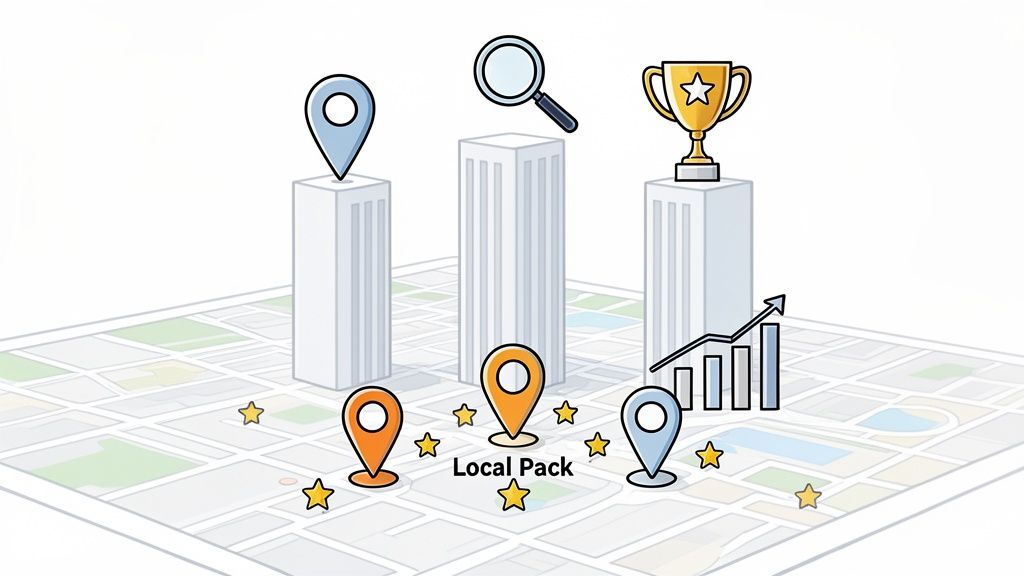
As you can see, all three pillars work together to get you into that coveted Local Pack. You can’t just rely on being close; you need the other two elements to truly succeed.
2. Relevance: Are You the Right Match?
Once proximity is established, Google asks another question: how relevant is this business to what the user wants? This is where the details of your Google Business Profile become incredibly important.
Imagine someone searches for “dog-friendly pub in Bristol.” Google immediately starts scanning profiles for signals that prove you’re a good fit. It’s looking for clues like:
- Your Categories: Is your primary category “Pub”? Do you have attributes like “dog-friendly” enabled?
- Your Services: Have you mentioned anything about welcoming dogs in your business description or posts?
- Your Content: Do customer reviews or the Q&A section mention people bringing their dogs?
This isn’t about stuffing keywords into your profile—that’s an old-school tactic that will only hurt you. It’s about being comprehensive and honest about what you offer. Your single most important move here is to select the perfect primary category. For a complete walkthrough, check out our guide on how to choose the right Google Business Profile categories to pull in the right kind of customers.
Key Takeaway: Think of relevance as being the perfect answer to a customer’s question. By filling out your profile in detail, you give Google all the evidence it needs to connect you with people who are actively looking for a business just like yours.
3. Prominence: Building Your Reputation
Prominence is essentially a measure of your business’s authority and reputation. Google wants to feature businesses that are well-known and trusted, so it looks for signals across the entire web, not just on your profile.
Think about it in the real world. A famous London hotel that has been around for decades, has thousands of reviews, and is frequently written about in travel blogs has massive prominence. A brand-new bakery in a small village, on the other hand, starts with very low prominence, even if their scones are the best in the county.
So, how do you build this online authority? It comes down to a few key signals:
- Reviews (Volume & Quality): A healthy, consistent flow of positive reviews is a massive vote of confidence.
- Local Citations: Getting your business Name, Address, and Phone number (NAP) listed correctly and consistently in quality online directories builds trust.
- Brand Mentions & Links: When a local newspaper, blogger, or community group links to your website, it acts as a powerful endorsement.
- Offline Prominence: Google is smart enough to gauge real-world popularity, too. A business that gets a lot of visitors or direction requests is seen as more prominent.
Building prominence isn’t a quick fix; it’s a long-term game. It’s the result of doing great work, encouraging happy customers to share their feedback, and building a brand that people know, respect, and talk about both online and off.
What’s New on the Radar for 2026?

Proximity, relevance, and prominence are still the bedrock of local rankings, but they’re no longer the whole story. As we look towards 2026, a new set of ranking factors has emerged, focused less on static information and more on real-time engagement. This is where you can really pull ahead of the competition.
Think of it this way: Google wants to recommend businesses that feel alive and responsive. It’s now rewarding profiles that show consistent, positive customer experiences, using signals that prove you’re actively engaging with your audience.
Ultimately, these signals are less about what you say about your business and more about what your customers’ actions show Google. Getting a handle on them is key to climbing the local search results.
The Power of Review Velocity and Response
Of course, reviews have always been important, but Google is looking at them differently now. It’s not just about your overall star rating; it’s about the rhythm and consistency of your feedback, a concept we call review velocity.
Google’s algorithm can easily spot unnatural patterns. If your profile gets a sudden burst of 50 reviews in a single day and then nothing for weeks, it looks fake. What Google wants to see is a steady, natural trickle of new reviews coming in each week. This tells the algorithm you’re a healthy, active business that’s consistently serving customers.
Just as important is how quickly you reply. Responding to reviews, both good and bad, sends a powerful signal to customers and Google that you’re attentive and value their feedback. It’s a huge trust-builder that directly boosts your prominence.
Reviews now represent 16% of the overall ranking weight in Google’s local algorithm, making them one of the most influential factors you can directly control. If you aren’t responding within 24-48 hours, Google may see that as a sign of a neglected profile, which can hurt your visibility.
AI Analysis of Review Content
Google’s AI has got incredibly sophisticated. It’s not just counting stars anymore; it’s actually reading the words in your reviews to understand sentiment and context. This is where many successful businesses are now focusing their efforts.
For example, when a customer writes, “The gluten-free pizza was the best I’ve ever had,” Google’s AI doesn’t just register a positive review. It makes a direct connection: this restaurant is a great spot for “gluten-free pizza.”
This is powerful because it allows your business to rank for very specific, long-tail keywords that your own customers are providing. If enough people rave about your “quick service” or “friendly staff,” Google learns that these are defining features of your business and will start showing your profile in searches for those exact terms.
Behavioural Signals That Prove Engagement
The final piece of this modern puzzle is all about behavioural signals. These are the actions people take on your Google Business Profile that show they’re genuinely interested in you. Google tracks every one of these interactions as proof that your profile is helpful.
Key behavioural signals include:
- Click-to-Call Rate: The number of people who tap the “Call” button.
- Direction Requests: How many users ask Google Maps for directions to your physical location.
- Website Clicks: People who click through to your website to learn more.
- Photo & Post Views: How much time users spend looking at your photos or reading your Google Posts.
A high number of these actions tells Google that people who find you also choose you. This creates a fantastic feedback loop: more engagement leads to better rankings, which drives more visibility and even more engagement. As Google’s AI gets even smarter, keeping up with these trends is vital. You can learn more about LLM SEO and AI search ranking to stay ahead. For a practical guide on putting this into practice, check out our article on how to use AI for local SEO.
Your Action Plan for Google Maps Dominance
Right, let’s move from theory to action. Knowing what makes Google Maps tick is one thing, but actually putting that knowledge to work is how you start pulling ahead of the competition. It’s time to roll up our sleeves and build a practical plan to get your Google Business Profile noticed.
There’s no magic bullet for ranking on Google Maps. Instead, real dominance comes from being consistent and deliberate in a few critical areas. We’ll walk through what matters most, starting with the absolute basics and building up from there.
Nailing the Fundamentals
Before you even think about the clever stuff, your basic information has to be perfect. Any slip-up here creates confusion for Google and chips away at the trust you’re trying to build. This is the foundation for everything else.
First things first: your Name, Address, and Phone number (NAP) must be identical everywhere. We’re talking about your Google Business Profile, your website, and every single online directory. A tiny difference, like using “Ltd” in one place and “Limited” in another, can send mixed signals and weaken your authority.
Next, get ruthless with your business categories. As we covered earlier, your primary category is the single most powerful signal you send Google about what you do. Make sure it nails your main service. Then, use your secondary categories to flesh out all the other things you offer.
Actionable Tip: Take five minutes and do a quick audit. Google your business and look at the first 10-15 results. Is the NAP exactly the same on every single one? If you spot any variations, start fixing them now, beginning with the most important sites.
Build a Powerful Review Strategy
Think of reviews as your online word-of-mouth. They’re a massive factor in building your reputation and demonstrating ‘prominence’ to Google. The key is to build a system that consistently brings in genuine feedback. You can’t just sit back and hope for reviews; you need to politely and actively ask for them.
A huge part of this is simply getting good at online reputation management, because both positive comments and how you handle negative ones are crucial for local visibility. You absolutely have to respond to every review, good or bad. A quick, thoughtful response shows both potential customers and Google that you’re engaged and you care.
Here are a few ways to get your review engine running:
- Make it dead simple: Put a QR code on a receipt or a sign in your shop that links straight to your Google review page.
- Time it right: The best time to ask is right after a great experience when the customer is still feeling good about your business.
- Automate your replies: For busy businesses, tools like LocalHQ’s Review Autoresponder can be a lifesaver. It ensures every customer gets a timely, on-brand response, which saves you hours while sending all the right engagement signals.
Create a Constant Stream of Fresh Content
A dusty, untouched profile suggests your business might be out of date or, worse, closed. You need to show Google you’re active and relevant by regularly adding fresh content directly to your Google Business Profile.
Google Posts are your best friend here. Treat them like quick social media updates or mini-adverts. You can use them to:
- Announce a flash sale or a new product line.
- Share some company news.
- Highlight a seasonal service you’re offering.
Posts don’t last forever, so aiming for at least one new post a week is a solid goal. Each one is another chance to use keywords and prove you’re an active player in your local market.
At the same time, take control of your Q&A section. Get in there and answer the questions people frequently ask before they even type them. Not only does this create a better experience for users, but it also lets you frame the answers with helpful info and your key terms.
Finally, keep uploading new, high-quality photos. People want to see your team in action, what goes on behind the scenes, or your latest work. If you can, make sure your photos are geotagged with your business’s location data before you upload them. It’s a subtle but smart way to reinforce your proximity signals.
Boost Your Prominence with Citations and Links
Google doesn’t just look at your profile; it also looks at how often you’re mentioned across the wider web. This comes down to two things: building citations and earning local links.
A citation is just an online mention of your business’s NAP. We’ve talked about keeping it consistent, but you also need to make sure you’re listed in the big, reputable directories for your industry and area (think Yell, Thomson Local, or TripAdvisor).
Even better are local links. This is when another local website—maybe a neighbourhood blogger, a community news site, or even a nearby business that offers a complementary service—links to your website. These are like powerful votes of confidence that tell Google your business is a respected part of the local fabric.
Juggling all of this can feel like a full-time job. That’s where a platform like LocalHQ can really help. Our AI Optimisation Wizard, for example, scans your profile to find those easy wins and missed opportunities. It then gives you clear, actionable suggestions based on what your competitors are doing, so you can make changes with confidence.
How to Measure Success and Outsmart Your Competitors

You’ve put in the work optimising your profile based on Google’s ranking factors, which is a fantastic first step. But the real question is, how do you know if any of it is actually making a difference?
Measuring local SEO success isn’t about chasing vanity metrics like impressions. It’s about connecting your efforts to the actions that bring money through the door. This means digging past the surface-level numbers to see what’s truly driving your business forward and finding the gaps your competitors are leaving wide open.
Reading Your Google Business Profile Insights
Your Google Business Profile has its own built-in dashboard called Insights. At first glance, it might seem a little basic, but it’s packed with the most important performance data for any local business. The trick is to ignore the noise and focus on what signals real customer intent.
Forget about obsessing over how many people simply saw your profile. Instead, you need to track the actions they take. These are the gold-standard metrics that prove your optimisation work is turning searchers into customers.
In your Insights report, zoom in on these three valuable actions:
- Phone Calls: How many times people hit the “Call” button on your profile. This is a direct, high-intent lead from someone who wants to talk to you right now.
- Direction Requests: The number of users who asked Google Maps for directions to your doorstep. It’s the clearest signal you can get that someone plans to visit.
- Website Clicks: How many people clicked through to your website to dig deeper, browse products, or book an appointment.
By keeping a regular eye on these numbers, you’ll start to see clear patterns emerge. Did you see a spike in calls right after publishing a new Google Post? That tells you the strategy is working and you should double down on it. For a much deeper dive, our complete guide to understanding Google Business Profile Insights will show you exactly how to interpret this data like a professional.
Going Beyond Your Office Walls with Geo-Grid Tracking
Here’s a hard truth about local search: checking your rankings from your office computer gives you a completely false sense of security. Of course you’ll rank #1—you’re searching from right on top of your own business address, and proximity is king in local SEO.
But what about the customer searching from three miles down the road? Or the one in the next town over? Their results will look completely different.
This is where geo-grid rank tracking becomes your secret weapon. A geo-grid tool simulates searches for your most important keywords from dozens or even hundreds of different points across your service area. It then builds a visual heat map of your true visibility.
It finally answers the most important question in local SEO: “Where do I actually show up for my customers?”
This LocalHQ Geo-Grid Tracker map says it all.
The green dots are where this business is winning, ranking in the top three. The yellow and red areas show where they’re practically invisible, losing out to the competition. This isn’t just interesting data; it’s a battle plan.
A geo-grid map instantly reveals your “ranking deserts”—the specific neighbourhoods or postcodes where you are invisible to potential customers. By identifying these weak spots, you can focus your optimisation efforts (like location-specific posts or geotagged photos) exactly where they will have the most impact.
Without this kind of intelligence, you’re flying blind and likely wasting time on optimisations that aren’t hitting your biggest problem areas. Geo-grid tracking lets you pinpoint your competitors’ weak spots and strategically move in to capture more customers across your entire market.
Right, we’ve covered a lot of ground on the different factors that get you noticed on Google Maps. Getting a handle on Proximity, Relevance, and Prominence—along with all the newer signals like customer engagement—is a constant balancing act. It can feel like you’re spinning a dozen plates at once, but figuring it all out doesn’t have to be a guessing game.
LocalHQ is designed to pull all those threads together, helping you manage reviews, schedule posts, and build your authority where it matters most. But before you can start improving, you need an honest look at where you’re really starting from.
Stop Guessing and Start Seeing
Ever wonder what your business looks like to a potential customer across town? If you’re just searching for yourself from your own office, you’re getting a skewed, best-case-scenario view of your rankings. You might be number one on your own doorstep but completely invisible a few miles down the road.
That’s a huge blind spot. To truly compete, you have to replace those assumptions with real-world data and see your business through your customers’ eyes, no matter where they are.
Key Insight: Winning at local search isn’t about ranking first at your own address. It’s about being consistently visible in all the neighbourhoods and postcodes where your customers actually live and work. Without that clear picture, you’re just optimising in the dark.
Uncover Your Biggest Opportunities for Growth
The smartest way to get ahead of the competition is to spot the gaps in their local coverage and, more importantly, in your own. When you can see exactly where your rankings start to fade, you can focus your energy precisely where it will have the biggest impact.
This is where the LocalHQ Geo-Grid Rank Tracker comes in. It gives you a true visual map of your visibility, showing your strong spots and, crucially, where you need to put in the work. It’s time to stop wondering and start knowing.
This kind of intelligence turns vague plans into targeted action. You’ll understand which Google Maps ranking factors need a boost in which specific areas. For even more ways to sharpen your strategy, check out some of the best local SEO tools that can help you climb the rankings. It’s time to finally see what your customers see and take full control of your local presence.
Frequently Asked Questions
When you start digging into how Google Maps works, it’s natural for a few questions to pop up. We hear these all the time from UK businesses trying to get a handle on their local search performance, so let’s clear them up.
How Long Does It Take to See Results from Google Maps SEO?
This is the classic ‘how long is a piece of string?’ question, and the honest answer is: it depends. You can often see a nice bump in a few weeks, especially if you’re sorting out the basics like fixing your business categories or getting your name, address, and phone number consistent everywhere.
But getting to the top of the Local Pack and staying there is a marathon, not a sprint. Building real authority through a steady stream of positive reviews and earning links from other local websites takes months of consistent work. Think of it as an ongoing effort – some fixes give you a quick win, but the real, lasting success is built over time.
Can I Rank in a City Where I Don’t Have a Physical Address?
Be really careful with this one. Google’s rules are incredibly strict here, and trying to game the system is a recipe for disaster.
If you’re a service-area business (SAB) – a plumber who travels to customers, for example – you absolutely can define a service area and rank there without showing a physical address on the map. However, using virtual offices or P.O. boxes just to get a pin in a city you’re not actually in is a major violation. It can get your whole profile suspended, and it’s just not worth the risk.
Do Google Posts Actually Help Rankings?
While Google Posts aren’t what we’d call a direct, heavy-hitting ranking factor by themselves, they absolutely help. Think of them as a powerful indirect signal.
Posting regularly shows Google that your business is active and engaged. Even more importantly, good posts encourage people to interact with your profile, driving those crucial behavioural signals like clicks to your website or calls to your business. And those signals are definitely something Google pays attention to.
Are Some Negative Reviews Bad for My Business?
It sounds odd, but a profile with nothing but glowing five-star reviews can sometimes look a bit suspicious to savvy customers. A few bits of constructive criticism can actually make your business look more real and trustworthy.
The real secret is in your response. A prompt, professional, and helpful reply to a negative review can completely turn the situation around. It shows both potential customers and Google that you care, listen to feedback, and are committed to good service.
Mastering these google maps ranking factors isn’t about finding a single magic bullet; it’s about a consistent, smart approach. LocalHQ provides the tools to see exactly what’s working, from understanding your real-world visibility to managing your reputation with ease.
Learn more about How to Rank in Google Maps.