Master Your Reputation with a Google Review Autoresponder

A Google review autoresponder is a nifty bit of software that automatically replies to customer reviews left on your Google Business Profile. Think of it as your 24/7 front-of-house team, making sure every customer gets a quick, on-brand "thank you" or acknowledgement, whether they’ve left a glowing five-star review or a tricky one-star comment.
Why an Automated Responder Is a Local SEO Game Changer
These days, Google reviews aren't just feedback; they're the currency of your local reputation and a massive signal to search engines. But let's be honest, for most local businesses, trying to keep up with a constant stream of reviews is a real headache. This is exactly where a Google review autoresponder stops being a "nice-to-have" and becomes a core part of your strategy.
Manually replying to every single review takes a huge amount of time, and it's easy for replies to become inconsistent, especially if you're managing multiple locations or just flat-out busy. Any delay can make a customer feel ignored and chip away at their perception of your business. An automated system flips this on its head, turning a daily chore into a powerhouse for managing your reputation and boosting your search engine optimisation (SEO).
The Direct Impact on Your Google Ranking
The link between how fast you reply to reviews and your local search ranking is stronger than you might think. Google's algorithm absolutely loves businesses that are active and engaged with their customers. When you consistently reply to reviews—and do it quickly—you're sending a crystal-clear signal that you're an attentive, customer-focused business.
This high level of engagement triggers a few positive knock-on effects that really help your visibility:
- It Encourages More Reviews: When potential customers see that a business actually takes the time to reply, they're far more likely to leave their own feedback. This kicks off a brilliant cycle, giving Google more fresh, relevant content about your business.
- It Boosts Your Local Pack Performance: Higher engagement, combined with a steady stream of positive reviews, seriously improves your chances of landing in that coveted "local 3-pack" at the top of the search results.
- It Builds Powerful Trust Signals: A profile brimming with reviews and replies acts as powerful social proof. It tells both Google and potential customers that your business is trustworthy and cares about its patrons.
Building a Foundation of Customer Trust
Putting the technical SEO benefits aside for a moment, an autoresponder genuinely strengthens your relationship with your customers. An instant acknowledgement shows you value their opinion. That simple act can turn a so-so experience into a positive one and, crucially, a negative one into an opportunity to make things right.
By making sure no customer comment is ever ignored, you're building a public record of outstanding customer service. This not only helps you keep the customers you have but also wins over new ones who are checking you out online.
A recent report drove this point home, finding that in the UK, 79% of businesses see their Google Business Profiles and reviews as a highly effective way to connect with their audience. What's more, two-thirds of users believe it directly helps bring in new customers and increases foot traffic.
This digital-first approach to customer service is a non-negotiable part of any modern marketing plan. To get the full picture, it's worth learning more about what local search optimisation involves and how review management slots into that wider strategy. By automating those initial replies, you free up your team to focus on what they do best, all while your online reputation works tirelessly for you in the background.
Setting Up Your Google Review Autoresponder
Alright, let's get into the good stuff – moving from theory to practice. Setting up a Google review autoresponder for the first time is actually quite straightforward, but it completely changes the game for managing customer feedback. The first thing you'll do is connect your Google Business Profile to a dedicated platform, like LocalHQ. Think of this as your central command hub for all things reviews.
Once that connection is live, you can start building the rules that will power your automated replies. This isn't just about being fast; it's about making sure every single message feels like it came from you and perfectly captures your brand's voice.
This simple workflow shows just how a well-oiled review response system directly fuels your local ranking.
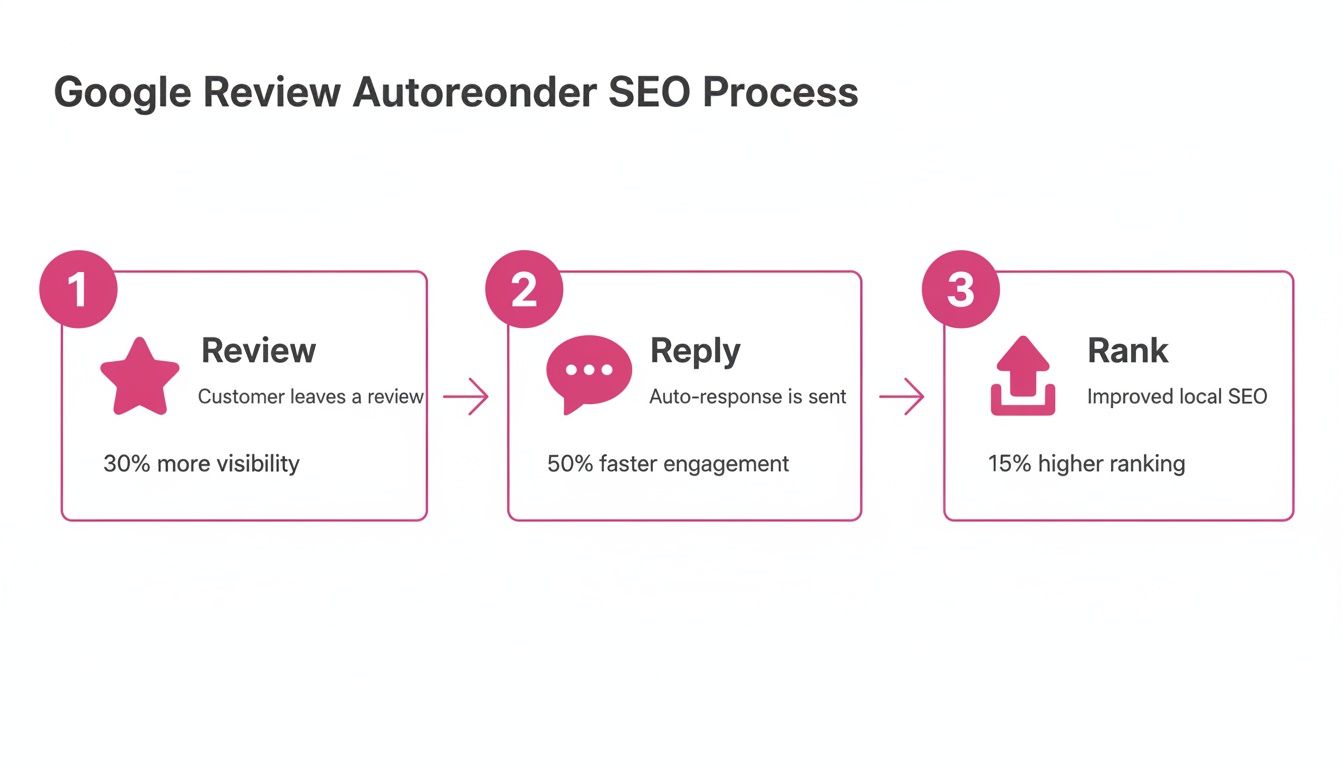
As the graphic shows, it’s a powerful cycle: actively replying to reviews boosts engagement, which signals to Google that your business is active and authoritative. The result? A nice little bump in your search ranking.
Establishing Your Core Response Rules
The real magic behind a great autoresponder isn't just speed, it's the intelligence of its triggers. Instead of blasting out the same generic message to everyone, you can create genuinely nuanced responses based on specific criteria. This is what makes each reply feel right for the situation.
The most common and effective trigger is, of course, the star rating. You would never send the same reply to a 1-star review as you would a 5-star one, and your autoresponder shouldn't either.
Here’s a typical setup I recommend:
- 5-Star Reviews: Trigger an enthusiastic, grateful response that really celebrates the fantastic feedback. Make them feel amazing.
- 4-Star Reviews: A warm thank you is perfect here. Acknowledge their great experience but maybe leave the door ajar for any tiny bit of feedback they might have.
- 3-Star Reviews: This is where you shift to a more neutral, appreciative tone. Thank them for taking the time to leave feedback and show them you're listening.
- 1 & 2-Star Reviews: This requires an immediate, empathetic acknowledgement. Apologise for their poor experience and give them a clear, simple path to get in touch directly so you can resolve it.
This tiered approach means every customer gets a context-aware first response, usually within minutes of posting their review.
Using Keyword Triggers for Deeper Customisation
Beyond star ratings, the really smart systems let you use keyword-based triggers. This adds a fantastic layer of relevance to your automated replies, making them feel much more personal. You can set up rules that fire off a specific response only if a review contains certain words or phrases.
Imagine you run a restaurant. You could have a rule that if a 5-star review mentions "amazing service" or a specific staff member's name, the auto-reply includes a special line like, "We're so glad our team made your visit special!"
On the flip side, if a negative review mentions "cold food," the system can trigger a very specific apology and fire off an internal alert straight to your kitchen manager. See how that makes your automated system feel incredibly attentive?
The goal is to build a system that works tirelessly in the background, ensuring no customer ever feels ignored. This automated vigilance protects your reputation around the clock, long after you’ve closed for the day.
Getting this right is becoming more and more important. In the UK, while 21.1% of businesses are adopting AI for customer service, a huge 48.9% remain unsatisfied with their overall customer response management. This points to a massive gap where a well-configured Google review autoresponder can make an immediate and measurable difference.
When you're looking at your options, tools like the SupportGPT app can offer advanced AI features for generating more human-like responses. Combining a solid platform with smart, thoughtful rules is the key to building a truly effective system that works for you.
Crafting Responses That Feel Human, Not Robotic
Let's be honest, the biggest mistake you can make with a Google review autoresponder is letting it sound like a robot wrote it. The whole point of automating this process isn't to remove the human element, but to nail the speed and consistency. This frees you up to focus on the quality of the interaction, creating a system where every customer feels seen and heard.
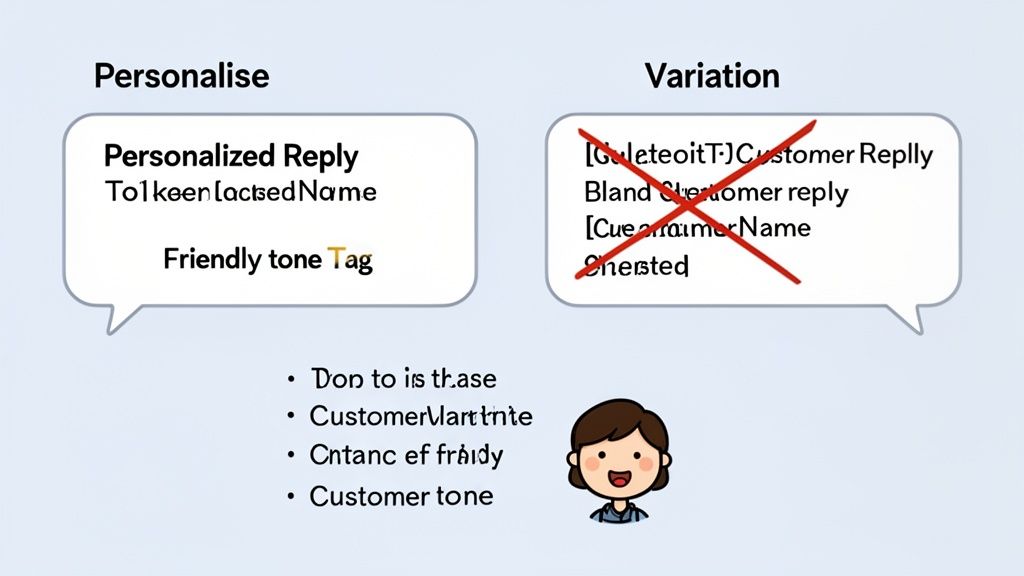
The real magic is in the details. When you move beyond a bland "thank you for your feedback," you transform a basic tool into a powerful asset for managing your reputation. It's about building a library of responses that not only go out instantly but actually improve the customer's experience with your brand.
The Power of Personalisation Tokens
The quickest win for adding a human touch is using personalisation tokens. Think of them as smart placeholders in your templates that automatically pull in specific details from the review itself or your Google Business Profile.
These are the building blocks of a great automated reply. The most fundamental token is [CustomerName]. Kicking off a response with "Hi Sarah," instead of the impersonal "Hi there," is a tiny change that has a massive impact on how the message is received.
Other incredibly useful tokens include:
[LocationName]: Absolutely essential if you run more than one site. It confirms you're responding to their experience at your Manchester branch, not the one in Leeds.[ReviewRating]: Allows you to acknowledge their rating directly in your reply. Something like, "Thanks for the brilliant 5-star feedback!" feels much more specific.[YourName]: Adds a personal sign-off, whether from a specific manager or the entire team. "All the best, The Team at The King's Head" feels much warmer than a reply with no closing.
Using these tokens immediately lifts your responses from generic to specific. It shows the customer you've actually paid attention to who they are and where they visited.
Developing an Authentic Brand Voice
Your automated replies should always sound like they came from you, not a software manual. Before you write a single template, take a moment to really define your brand's tone of voice. Are you:
- Friendly and Casual? This works perfectly for a local coffee shop or a boutique store. Your replies can be enthusiastic and use more relaxed language.
- Professional and Authoritative? Ideal for a law firm or a financial consultant. Here, your responses should be polite, respectful, and reassuring.
- Quirky and Fun? A great fit for a creative agency or an independent record shop. This gives you licence to inject a bit of humour and personality.
Once you’ve settled on your voice, stick to it. Consistency is the key to building a brand that people recognise and trust, and that applies to every single customer interaction—automated or not.
A well-crafted automated response does more than just tick a box; it reinforces your brand's personality at a critical customer touchpoint. It’s an opportunity to show people who you are, not just what you sell.
To help you get started, here are a few examples of how you can tailor your automated responses to different star ratings while keeping your brand voice consistent.
Sample Auto-Response Templates by Star Rating
| Star Rating | Objective | Example Template (UK English) |
|---|---|---|
| ★★★★★ | Delight & Encourage Repeat Business: Show genuine appreciation and subtly invite them back. | "Wow, [CustomerName], thank you so much for the fantastic 5-star review! We're so glad you had a great experience at [LocationName]. We can't wait to see you again soon! Cheers, The Team." |
| ★★★★☆ | Acknowledge & Ask for Insight: Thank them for the positive feedback but show you're open to being even better. | "Thanks for the great 4-star review, [CustomerName]! We're thrilled you enjoyed your visit. We're always looking for ways to get that final star, so we'd love any extra thoughts next time you're in. Best, [YourName]." |
| ★★★☆☆ | Open a Dialogue & Show You're Listening: A neutral review is a chance to show you care and want to improve. | "Hi [CustomerName], thanks for taking the time to leave your feedback. We're sorry to see we didn't fully meet your expectations this time. We'd appreciate the chance to learn more – feel free to contact us at [email/phone]. Sincerely, The Management." |
| ★★☆☆☆ | Apologise & Escalate: Immediately apologise and provide a clear path for them to connect with someone who can help. | "Hello [CustomerName], we are very sorry to hear about your experience at [LocationName]. This is not the standard we aim for. Please could you contact our manager at [direct contact] so we can address this properly? Thank you." |
| ★☆☆☆☆ | Apologise Sincerely & Take It Offline: The priority is a sincere apology and moving the conversation to a private channel to resolve the issue. | "Dear [CustomerName], we are sincerely sorry that we let you down. We take this feedback very seriously and would appreciate the opportunity to discuss this with you directly. Please contact us at [direct contact details]. We hope to resolve this with you." |
These templates are just a starting point, of course. The real power comes from adapting them to fit your unique brand personality and customer base.
Creating Response Variations to Avoid Repetition
Nothing shatters the illusion of authenticity faster than a potential customer scrolling through your reviews and seeing the exact same reply copied and pasted dozens of times. This is why creating multiple response variations for each star rating is such a crucial tactic.
For your 5-star reviews, you could build a bank of five to ten different "thank you" messages. A good auto-response system can then be set to randomly select one each time a new 5-star review comes in. This simple step keeps your review profile looking fresh and stops your replies from becoming stale. When you combine this technique with AI, you can generate incredibly nuanced replies. To learn more, check out our guide on how to use AI for local SEO and see how it can boost customer engagement.
For instance, a Manchester pub could have these 5-star variations ready to go:
- "Cheers,
[CustomerName]! So glad you enjoyed your visit. Hope to see you for another pint soon!" - "Thanks for the fantastic 5-star review,
[CustomerName]! We're thrilled you had a great time with us." - "Brilliant! We really appreciate you taking the time to leave such kind words,
[CustomerName]."
This strategy makes your public-facing engagement feel much more dynamic and genuine, even when it's fully automated. Ultimately, the goal is to build a system that feels less like a machine and more like a consistently attentive and on-brand manager.
Turning Negative Reviews into Opportunities
Let’s be honest, a negative review can sting. It can feel like a direct hit to your business. But in my experience, that initial gut-punch feeling is a waste of energy. A bad review is actually a golden opportunity—a chance to show everyone watching just how seriously you take customer service.
With the right setup, you can turn a public complaint into a public win. A smart Google review autoresponder is your secret weapon here.
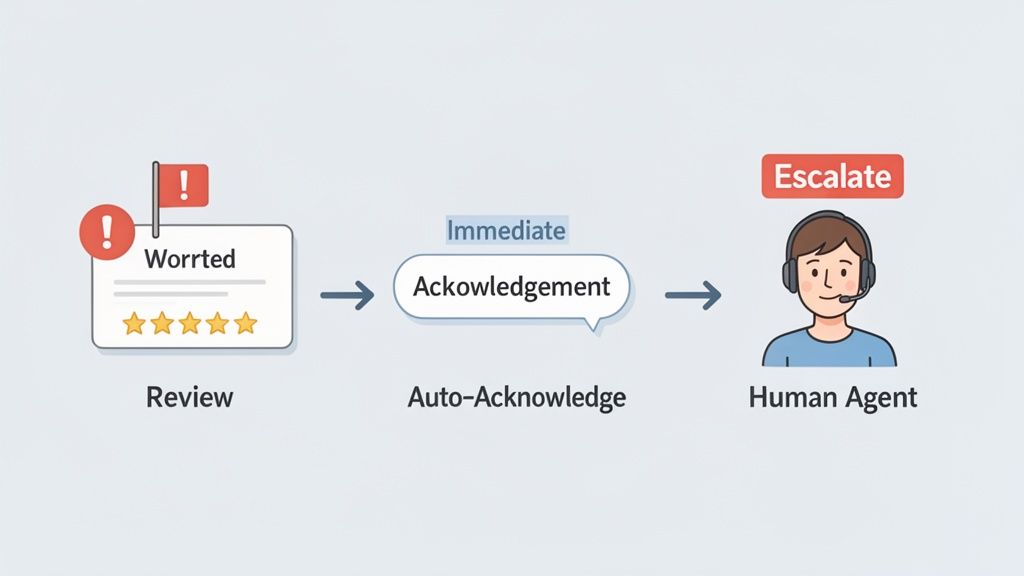
The trick isn't to let a robot solve the problem. That never works. Instead, the goal is a rapid, two-step play. First, the autoresponder immediately posts a public, empathetic acknowledgement. Second, at the exact same moment, it privately flags the review for a real person on your team to handle.
This blend of automated speed and human touch is what separates businesses that just get reviews from those that don't. You contain the public fallout within minutes while kicking off a proper internal process to figure out what went wrong and actually fix it.
The Immediate Acknowledgement Rule
For any review that’s one or two stars, speed is non-negotiable. The customer is actively upset, and letting their comment hang there unanswered just adds fuel to the fire. Your autoresponder needs to be set up to fire off a pre-written reply the second a negative review lands.
The sole purpose of this first response is to de-escalate. That's it. It’s not the time to be defensive, make excuses, or offer complex solutions. Its only job is to say, "We hear you, we're sorry you had a bad experience, and we want to make this right."
This quick response shows potential customers browsing your reviews that you’re attentive and care about feedback. More importantly, it buys your team crucial time to investigate what happened without leaving the unhappy customer feeling ignored.
Crafting Empathetic De-escalation Templates
Your templates for negative reviews need some real thought put into them. They must sound professional and apologetic, but most importantly, they need to offer a clear path to take the conversation offline. Getting into a public back-and-forth on your Google profile is a rookie mistake you don’t want to make.
A solid template should always include these key elements:
- A Sincere Apology: Kick things off by apologising for their experience. Something like, "We're sincerely sorry to hear…" or "We apologise that our service didn't meet your expectations."
- Validation of Their Feedback: You need to acknowledge their frustration without necessarily agreeing with every point. A simple, "This is certainly not the standard we aim for," shows you're taking them seriously.
- A Clear Call to Action: Give them a direct, private channel to talk to someone who can help. This should be a specific email address or phone number, preferably for a manager or senior team member.
- Personalisation Tokens: Always use
[CustomerName]to address them directly. It makes a huge difference.
The goal is to move the conversation from a public forum to a private one as quickly and smoothly as possible. This protects your reputation while giving you a genuine chance to resolve the customer's complaint.
When faced with tough feedback, knowing how to deal with irate customers effectively is a skill that pays dividends. Your template should be the first step in starting a productive, one-on-one conversation.
Creating an Internal Escalation Workflow
The second, and arguably more important, part of the strategy happens behind the scenes. As the autoresponder posts its public reply, it should also be triggering an internal alert.
A platform like LocalHQ can be configured to immediately ping a specific person—a store manager, a customer service lead, or even the business owner—the moment a 1 or 2-star review comes in.
This notification needs to be comprehensive, containing the customer's name, their full comment, and which location they visited. This gives your team a running start. They can check CCTV footage, talk to the staff on shift, or pull up order details before they even reach out to the customer.
This internal workflow ensures that negative feedback never gets lost in the shuffle. It creates a system of accountability and helps you spot and fix operational problems, preventing the same issue from cropping up again and again.
Measuring Success and Refining Your Strategy
Getting a Google review autoresponder up and running is just the start. If you treat it as a "set and forget" tool, you're leaving a massive amount of value on the table. The real gains come from treating it like any other vital part of your customer service strategy: you need to monitor it, learn from it, and continuously fine-tune your approach.
It’s about more than just seeing that replies are going out. You need to dig deeper and understand how those automatic responses are actually affecting customer perceptions and your reputation. By taking a data-led approach, you can prove the value of your efforts and make smart, targeted improvements to your templates and rules.
Key Performance Indicators That Actually Matter
It’s easy to get bogged down in metrics that look good but don’t mean much. Instead, zero in on the key performance indicators (KPIs) that tell you the real story about customer sentiment and business health. A dedicated platform like LocalHQ is built for this, giving you a clear view of what matters without needing to wrestle with spreadsheets.
Here’s what I always recommend clients focus on:
- Overall Star Rating Trend: Look at the bigger picture. Is your average star rating ticking up, even slowly, since the autoresponder went live? A steady climb is a brilliant indicator that quick engagement is making customers feel heard.
- Review Volume: Are more people leaving reviews? It might seem counter-intuitive, but when customers see you're actively responding, they're often more motivated to share their own feedback. This creates a fantastic loop of social proof.
- Response Rate: Your autoresponder should be hitting a 100% response rate, but you still need to keep an eye on it. This is your fundamental engagement metric, and any dip could signal a technical glitch that needs immediate attention.
- Sentiment Analysis: This is where things get really interesting. Good tools can track the language in your reviews over time. Are you seeing fewer negative words like "slow" or "rude"? Are positive terms like "friendly" and "efficient" appearing more often? That’s a clear sign your operational changes are working.
When you track these specific metrics, your autoresponder stops being just a tool and becomes a source of genuine business intelligence. The data doesn't just show you if you're succeeding; it points you exactly where you need to improve.
Using Analytics to Refine Your Templates
Your analytics dashboard is a treasure trove of information for making your response templates better. By looking at the patterns in your reviews, you can see what truly connects with your customers.
For example, I once worked with a client who noticed a lot of their 4-star reviews mentioned that the prices were a little high, but the service was fantastic. This was a golden opportunity. We tweaked their 4-star template to acknowledge this directly: "Thanks for the great feedback, [CustomerName]! We're so pleased you enjoyed our service and we always aim to provide excellent value. We hope to see you again soon!" It’s a small, data-driven change that shows you’re paying attention to the details.
Spotting Recurring Issues and Operational Gaps
Perhaps the most powerful benefit of analysing your review data is its ability to flag repeating problems. Imagine you suddenly see a cluster of 2-star reviews all complaining about "long wait times" at one of your locations. Your autoresponder has just done more than simply reply to a few unhappy customers—it’s handed you a critical operational issue on a silver platter.
With a platform like LocalHQ, you can filter reviews by rating, location, and keywords in seconds. This lets you quickly determine if a problem is a one-off complaint or a systemic issue that needs a real fix, whether that’s more staff training or a change in your stock management. This transforms reactive customer feedback into a proactive tool for improving your entire business from the ground up. By fixing the root cause, you don’t just stop future negative reviews; you create better experiences that lead to glowing ones.
Got Questions? We’ve Got Answers
Switching to a Google review autoresponder is a great step, but it’s completely normal to have a few things you’re wondering about first. Let’s tackle the most common questions head-on, giving you the clear, practical answers you need to get started with confidence.
Will Using an Autoresponder Hurt My SEO?
Actually, it’s the other way around. When you use an autoresponder strategically, it can give your local search engine optimisation (SEO) a real lift. Google’s algorithm loves to see active, engaged businesses. By replying quickly to every single review, you’re sending a powerful signal that you’re switched on and care about your customers.
This consistent engagement, paired with the new reviews that fast responses tend to encourage, helps improve your visibility in the local pack and on Google Maps. The trick is making sure your automated replies don't sound robotic. They need to be high-quality and feel personal, which is exactly what platforms like LocalHQ are designed for.
Can I Actually Customise Replies for Different Kinds of Reviews?
Absolutely. In fact, that's the whole point of a good autoresponder system. You aren’t just sending one generic message. Instead, you create a whole library of templates based on the star rating. A glowing 5-star review should get a response full of gratitude, while a 1-star review needs a more apologetic tone that immediately offers a way to fix things.
You can even take it a step further. More advanced systems let you create rules based on specific keywords. Imagine having a unique, pre-written reply ready to go anytime someone mentions your ‘customer service’ or the ‘delivery speed’. It makes your automated responses feel incredibly specific and thoughtful.
What’s the Best Way to Handle Really Negative or Detailed Reviews?
For tricky negative reviews, you need a two-pronged approach. Your autoresponder should fire off an immediate, professional reply. This first response isn't about solving the problem right there in public; it's about acknowledging their experience and moving the conversation offline.
A solid template for this looks something like: "We're so sorry to hear about your experience, [CustomerName]. This isn't the standard we aim for. Please could you contact our manager directly at manager@example.co.uk so we can look into this for you properly?"
At the same time, your system should automatically flag that review and ping a manager or senior team member. This ensures a real person can follow up properly. You get the speed of automation upfront, backed by the essential human touch for sensitive situations.
Is It Possible to Manage This Across Multiple Locations?
Yes, and this is where tools like LocalHQ become a massive time-saver for any business with more than one branch. You can manage the autoresponder rules for all of your Google Business Profiles from one central dashboard.
You can build a set of core, on-brand templates and then tweak them slightly for each location if you need to. This setup not only keeps your brand voice consistent everywhere but also saves a huge amount of admin work. It guarantees every single one of your locations is meeting the same high standard of customer engagement, without you having to check in on each one individually.
Ready to stop manually replying to reviews and turn customer feedback into a tool for growth? LocalHQ makes it easy to set up a smart, on-brand Google review autoresponder that works around the clock. Start your free trial today and see the difference it makes.