Mastering Google MyBusiness Listing SEO for Local Success
When we talk about Google Business Profile SEO, what we're really talking about is getting your business seen in local searches and on the Google Maps "Map Pack". It's the art and science of fine-tuning your profile with the right information, keywords, and active management to pull in local customers right here in the UK.
Your Most Powerful Local SEO Tool
Your Google Business Profile (GBP) isn't just a simple online listing; it's the digital front door for anyone searching for you locally. If you're serious about winning in local search, you can't afford to ignore it. A fully fleshed-out profile is one of the strongest signals you can send to Google, and it heavily influences whether you show up in that all-important 'Map Pack' where customers are ready to make a choice.
Think of it as the foundation of your local online presence. It’s the first place customers look for your phone number, opening hours, or directions. They'll read your reviews there long before they ever think about clicking through to your website. It truly is your most powerful local SEO asset, which is why understanding strategies for boosting online visibility through search engine optimization for barber shops and similar local businesses is so critical.
Turning Clicks into Customers
The end goal is simple: turn your profile's visibility into real-world actions that grow your business. Every single element, from the way you write your business description to the photos you share, contributes to this.
- Phone Calls: A single tap and a potential customer is on the line.
- Direction Requests: Literally guiding new customers straight to your doorstep.
- Website Visits: Sending highly interested people to your site to learn more or make a purchase.
This journey from a potential customer searching online to taking a concrete action is a clear, direct path.

As you can see, it all starts with visibility. That visibility drives engagement, which in turn leads to the conversions—the sales, bookings, and calls—that matter.
The numbers back this up, especially for businesses in the UK. European businesses see an average of 3.4 interactions per user on their profiles each month, a touch higher than the global average. Even more telling is that a complete profile converts 3.2 times more often than a bare-bones one. The data doesn't lie.
Your Google Business Profile isn’t a ‘set it and forget it’ task. It’s a living, breathing marketing channel. It needs consistent attention to show both Google and your customers that you’re active and relevant.
For any business trying to manage more than one location, keeping all these profiles consistent and optimised can quickly become a logistical nightmare. That’s where a platform like LocalHQ steps in. It gives you a single, central hub to manage, update, and optimise every single listing, ensuring your brand stays consistent and dominates local search across all your locations.
Building Your Foundation for Local Dominance
Think of your Google Business Profile (GBP) as the digital front door to your business. Getting the initial setup right is like laying the foundations for a new building – if you skimp on this first stage, you'll be dealing with cracks and problems for years to come. Your entire local SEO strategy rests on this foundation, so it pays to be meticulous from the get-go.
The journey starts by claiming and verifying your business listing. This is the non-negotiable first step that proves to Google you're the real owner, giving you the keys to manage your information, reply to reviews, and see how customers are finding you.

An unverified profile just looks neglected. It sends a signal to both Google and potential customers that you might not be active or trustworthy, which is the last thing you want.
Nailing Your NAP Consistency
If there's one acronym to burn into your brain for local SEO, it's NAP: Name, Address, and Phone number. Google is a bit of a detective, and it scours the web—your website, social media, online directories—looking for this information to confirm you are who you say you are.
Little inconsistencies can cause big headaches. Using "Ltd." in one place and "Limited" in another, or having an old phone number lurking on a forgotten directory, creates confusion for search engines. This uncertainty can chip away at Google's trust in your data, which can directly harm your local search rankings.
Think of your NAP as your business's digital fingerprint. It needs to be absolutely identical everywhere it appears online to build a strong, cohesive presence that search engines can easily recognise and reward.
Before you even finalise your profile, do a quick audit of your business online. Settle on one definitive version of your NAP and make that the gold standard you use everywhere, starting with your GBP.
To get a clearer picture of what makes a profile tick, let's break down the essential components and why each one is so crucial for your local search performance.
Essential GBP Components and Their SEO Impact
| Profile Component | What It Is | Why It Matters for SEO |
|---|---|---|
| Business Name | Your official, real-world business name. | This is your primary identifier. Consistency here is paramount for NAP alignment and brand recognition. |
| Address | Your physical, verifiable business location. | A core ranking factor for proximity-based searches ("near me"). It must match other online citations. |
| Phone Number | Your primary business contact number. | Completes the NAP trifecta. Essential for customer contact and for Google to verify your business details. |
| Categories | Descriptions of what your business is and does. | Directly influences which search queries your profile appears for. The primary category has the most weight. |
| Business Description | A 750-character summary of your business. | An opportunity to weave in relevant keywords and tell potential customers what makes you unique. |
| Photos & Videos | Visual content showcasing your location, products, and team. | Increases engagement and trust. Profiles with more media get more clicks and direction requests. |
| Reviews & Responses | Customer feedback and your replies to it. | A massive trust signal. Google favours businesses with a high volume of positive, recent reviews. |
As you can see, every piece of your profile serves a purpose. Filling out each section thoughtfully and accurately gives Google more positive signals to work with, which is exactly what you want.
Choosing Your Categories Wisely
Your choice of business category has a massive impact on the searches you show up for. You get one primary category and the option to add several secondary ones. Be specific with that primary choice—it should describe your core business perfectly.
For instance, if you run a coffee shop that has a great brunch menu, your primary category must be "Coffee Shop," not the broader "Restaurant."
Once that’s locked in, use the secondary categories to cast a wider net. For our coffee shop example, you could add:
- Brunch Restaurant
- Cafe
- Sandwich Shop
These extra categories help Google understand the full breadth of your services, matching you with more niche customer searches without muddying the waters of your main offering.
Navigating the Verification Process in the UK
After plugging in your initial details, Google will want to verify you. The methods can vary, but the classic postcard verification is still very common for UK businesses. Google will post a card with a unique code to your business address, and you simply enter that code into your profile to seal the deal.
You might also be offered other options:
- Phone or Text: A code is sent straight to your business phone.
- Email: You get an instant verification code in your business inbox.
- Video Recording: This is becoming more common. You might be asked to record a short video showing your premises, branding, or proof that you manage the business.
Don't panic if the postcard takes a week or two to arrive; that's completely normal. While you can contact Google support for major delays, it's usually best to be patient. This thorough process is what keeps local search results reliable for everyone. The UK has firmly established itself as a major centre for digital business, with 1,402,671 websites actively using Google Analytics, ranking second in the world. This shows how crucial data-driven optimisation has become, making a correctly verified and managed GBP essential for competing effectively. You can discover more about the importance of profile optimisation from recent industry insights.
Taking Your Profile to the Next Level to Outrank Competitors
Right, you’ve got the basics sorted. Your profile is verified, the essential info is there. Now for the fun part – turning that static listing into a magnet for local customers and pulling ahead of the competition. This is where the real work begins, but it’s also where you see the biggest results.
It’s all about consistent, thoughtful optimisation. We're talking about a mix of smart copywriting, eye-catching media, and genuine customer engagement. This is how you signal to Google that your business isn't just another pin on the map; it's active, relevant, and the absolute best choice for someone searching nearby.

Think of it less as a one-and-done task and more as a continuous effort. Every update, every photo, every response is a signal that directly impacts how often you show up in the coveted local pack and on Google Maps.
Nail Your Business Description with Keywords
That business description box is prime real estate. You get 750 characters, and you need to make every single one count. This is your chance to tell people what you're all about while weaving in the keywords they're actually searching for.
Put yourself in your customers' shoes. What terms would they type into Google?
A plumber in Manchester, for instance, could just write: "We are a local plumbing company." It’s true, but it’s bland and misses a huge opportunity.
A much better, optimised version sounds more like this: "Your trusted Manchester plumber for emergency call-outs, boiler repairs, and central heating installation. We offer authorised, fixed-price services across Greater Manchester, ensuring quality workmanship and reliable solutions for your home." See the difference? It's packed with specific services and location-based terms that match real-world searches.
Use Attributes to Win Niche Searches
Don’t just skim past the 'Attributes' section. These are the little details and icons on your profile that can make a massive difference. Think of them as filters. When someone searches for "restaurants with outdoor seating," Google looks for businesses that have ticked that exact attribute.
It’s tedious, I know, but take the time to go through every single attribute available for your business category. You'd be surprised what you'll find.
Some of the most impactful ones include:
- Accessibility: Is there a 'Wheelchair-accessible entrance' or 'Wheelchair-accessible toilets'? For many people, this isn't a bonus; it's essential.
- Amenities: This covers everything from 'Free Wi-Fi' to 'Gender-neutral toilets'.
- Payment Options: Let people know upfront if you take credit cards or mobile payments.
- Service Options: Things like 'Kerbside pickup', 'Delivery', or 'Online appointments' became critical in recent years and are still heavily searched for.
By selecting every relevant attribute, you're not just adding details. You're optimising your profile for hundreds of potential long-tail searches you'd never think to target with traditional SEO.
Find Your Rhythm with Google Posts
Google Posts are basically mini-adverts or updates that show up right on your profile. They are one of the strongest signals you can send to Google that your business is alive and kicking. A profile that’s regularly updated is always going to look more current and trustworthy than one that's been left to gather dust.
You don't need to post every day, but try to find a consistent rhythm, even if it's just once a week. A simple content plan makes this easy.
- Offers: Got a sale on? "15% off all coffee before 10 am this week." These have start and end dates, which naturally creates a bit of urgency.
- What's New: Share a new product, a fresh blog post, or even a screenshot of a fantastic new review.
- Events: If you're running a workshop, a special sale, or an open evening, this is the perfect place to post the details.
Make sure every post has a great photo or a short video and a clear call-to-action (CTA) button like 'Learn More', 'Book', or 'Call Now'. This transforms your profile from a passive listing into an interactive hub.
Develop a High-Impact Photo and Video Strategy
People connect with visuals. It's that simple. In fact, Google’s own data shows that businesses with photos get 42% more requests for driving directions and 35% more clicks through to their websites. Your goal should be to show an authentic, comprehensive view of your business.
- Cover & Logo: These are your first impression. Make sure they’re high-quality and look professional.
- Interior & Exterior: Help customers know what to expect before they even arrive. Snap some clear shots of your entrance, the inside of your space, and any unique features.
- Products & Services in Action: A restaurant needs photos of mouth-watering food. A decorator needs compelling before-and-after shots. Show, don't just tell.
- Team Photos: Putting a friendly face to the name makes your business feel more human and trustworthy.
And don't sleep on video! A simple 30-second walk-through of your shop or a quick "hello" from the owner can do wonders for building a personal connection.
Get Ahead of the Game with Q&A
The Questions & Answers section is a public forum on your profile. Anyone can ask a question, and crucially, anyone can answer it. If you ignore this section, you're leaving the door open for incorrect information to be posted by well-meaning (or not-so-well-meaning) people.
The best strategy here is to be proactive. Sit down and make a list of all the questions you get asked constantly. Then, post both the questions and the answers yourself. This lets you control the conversation and provide accurate info straight away.
Think about common queries like:
- "Do you have parking available?"
- "What are your weekend opening hours?"
- "Are you dog-friendly?"
- "Do I need to book an appointment?"
By seeding your own Q&A, you’re building a handy FAQ right into your profile. It saves customers time, reduces their uncertainty, and shows that you're an attentive and helpful business before they've even picked up the phone.
Mastering Reviews and Reputation Management
In the world of local search, customer reviews aren't just bits of feedback; they're one of the most powerful signals you can send to Google. They build trust, offer genuine social proof, and have a direct impact on your visibility in the all-important Map Pack.
But here’s the thing: getting a steady stream of glowing reviews doesn't just happen. You need a proactive strategy.
Think of it this way: every new review is a fresh piece of user-generated content about your business. Google absolutely loves seeing this kind of activity. It interprets frequent, positive reviews—and importantly, your prompt responses—as a clear sign that a business is active, valued by its community, and deserves a higher ranking. A profile with reviews from two years ago? It sends the exact opposite message.

Encouraging Positive Customer Feedback
The simplest way to get more reviews is often the one people forget: you just have to ask.
Timing is everything. The absolute best moment to make the request is right after a great experience, when the customer's satisfaction is still buzzing. You can make this a seamless part of your customer journey.
- Email or SMS follow-ups: After a purchase or service, an automated message with a direct link to your GBP review page works wonders.
- QR codes on-site: A simple sign at your till, on a table, or tucked into packaging with a QR code makes it incredibly easy for customers to leave feedback right there and then.
- A gentle nudge on invoices: A simple line at the bottom of a receipt, like "Enjoyed our service? We'd love to hear about it on Google," can be surprisingly effective.
When you do ask, keep it simple and personal. A template we’ve seen work wonders is: "Hi [Customer Name], thank you for choosing us today! If you have a moment, we'd be grateful if you could share your thoughts on Google." Our guide offers more practical tips on how to get more Google reviews and build a solid feedback loop.
The Art of Responding to Every Review
Your job isn't over when the review comes in. Responding to all feedback—the good, the bad, and the neutral—is non-negotiable. It shows potential customers that you're an engaged business owner who genuinely cares about what people think.
Of course, sometimes reviews don't appear as they should. Understanding the common reasons for this is key, so it’s worth knowing how to fix Google reviews not showing up to keep your feedback pipeline healthy.
A thoughtful, professional response to a negative review is a public masterclass in customer service. You can turn a disgruntled customer into a loyal advocate and show everyone else you take responsibility.
For a negative review, try this simple framework:
- Acknowledge and Apologise: Thank them for the feedback and express regret that their experience wasn't up to scratch.
- Stay Calm and Professional: Stick to the facts. The last thing you want is a public, emotional argument.
- Take it Offline: Offer a solution by inviting them to discuss the issue directly via phone or email. This shows you're serious about making things right.
And don't forget the positive ones! A personalised "Thank you" reinforces that customer's good feeling and encourages others to share their own positive experiences.
Navigating the New Landscape of UK Reviews
The way reviews work is set for a significant change, especially for UK businesses. Google is rolling out a pseudonymous review system, which represents a fundamental shift. Starting in 2026, users can post reviews with nicknames and photos instead of their full names, and crucially, business responses will be moderated by Google before they go live.
This change was spurred on by the CMA's intervention in January 2025 to clamp down on fake reviews, and it places an even greater emphasis on authentic reputation management. Staying on top of this evolving environment is key.
This makes managing a high volume of reviews even more complex, particularly if you run a multi-location business. This is where a bit of smart automation can be a game-changer. AI-powered tools, like LocalHQ's Review Autoresponder, are designed to handle this task efficiently. You can configure it to deliver on-brand, personalised replies instantly, ensuring no review goes unanswered while maintaining a consistent voice across all your locations. It’s how you scale your reputation efforts without sacrificing quality.
Measuring Your Results and Scaling Your Strategy
Optimising your Google Business Profile without tracking what happens next is just throwing things at the wall and hoping something sticks. You absolutely have to know what's working, what's falling flat, and where your biggest opportunities are hiding. This isn't just about ticking boxes; it's how you prove your efforts are worthwhile and make smarter decisions for growth.
Tracking your performance turns vague feelings like "I think we're getting more calls" into hard data. It shows you exactly how potential customers in the UK are finding and interacting with your business, moving your Google MyBusiness Listing SEO from an art form into a science.
Getting to Grips with Google Business Profile Insights
Your first stop for performance data is the analytics built right into your Google Business Profile, which Google now simply calls 'Performance'. It's a goldmine of information, but let's be honest, the terminology can be a bit confusing at first.
Let's break down the most important metrics to keep an eye on.
The 'How customers search for you' report is particularly revealing. It splits your search visibility into three distinct types, each telling a different story:
- Direct: These are people who searched specifically for your business name or address. They already know who you are.
- Discovery: This is the big one. These are people who searched for a category, product, or service you offer—like "plumber near me"—and your profile popped up. This is pure local SEO gold, as it represents new customers finding you for the first time.
- Branded: This is a bit of a hybrid, capturing searches for your brand or a brand related to your business (e.g., "Nike trainers" if you're a shoe shop).
A high, and hopefully growing, percentage of 'Discovery' searches is a brilliant sign that your optimisation work is paying off. You're successfully getting in front of people who had no idea you existed moments before.
Tracking the Actions That Matter
Beyond just seeing how people find you, the Performance report shows what they do next. The 'Customer actions' section is where you see the real-world impact of your profile—the stuff that actually affects your bottom line.
This section tracks tangible interactions like:
- Website clicks: The number of people who clicked the website link on your profile.
- Direction requests: How many users asked Google Maps for directions to your physical location.
- Phone calls: The volume of calls made by tapping the 'Call' button directly from your profile.
These aren't vanity metrics; they represent real leads and potential sales. A steady increase in these actions month-on-month is a powerful signal that your local SEO strategy is delivering real, tangible results.
Don't just glance at the total numbers. Look for the trends. Did direction requests spike after you uploaded those new photos? Did calls surge right after you published a new Google Post? This is how you figure out precisely which of your actions are driving the most engagement.
To truly understand the value your profile is generating, you need a way to connect these actions back to your overall business goals. This means going a step beyond the standard insights and bringing in some more advanced tracking.
GBP Performance Metrics: What to Track
The data in your GBP Performance report provides a direct line of sight into customer behaviour. Understanding these KPIs is fundamental to refining your local search strategy.
| Metric | What It Measures | Actionable Insight |
|---|---|---|
| Search Views | Total number of times your profile appeared in search results (both on Search and Maps). | A high number of views is good, but you need to know what kind of searches are driving them. |
| Discovery Searches | Number of views from non-branded, categorical searches (e.g., "best cafe in Bristol"). | This is your primary indicator of new customer acquisition through local SEO. A rising number means your optimisation is working. |
| Direct Searches | Number of views from people searching directly for your business name or address. | This reflects your brand awareness and repeat customer base. |
| Website Clicks | Clicks on the website link from your GBP. | Measures how well your profile converts searchers into website visitors. Is it compelling enough for them to want to learn more? |
| Direction Requests | Users who requested directions to your business via Google Maps. | A critical metric for any brick-and-mortar business. It's a strong signal of purchase intent. |
| Phone Calls | Clicks on the 'Call' button on your profile (from mobile devices). | This is a direct lead generation metric. Tracking call times can reveal when your customers are most active. |
| Photo Views | The number of times your photos have been viewed compared to competitors. | Shows how engaging your visual content is. If your views are low, it's time to add better, more recent photos. |
By regularly reviewing these metrics, you can stop guessing and start making data-informed decisions that directly improve your local visibility and drive more customers through your door.
Advanced Tracking with UTM Parameters
Here’s a pro tip that will help you connect all the dots: start using UTM parameters. These are simple tags you add to the end of your website URL in your GBP. They don't change the page your visitors land on, but they tell your analytics platform (like Google Analytics) exactly where that traffic came from.
For example, instead of just yourwebsite.co.uk, you would use a URL like this:yourwebsite.co.uk/?utm_source=google&utm_medium=organic&utm_campaign=gbp
This lets you create a specific segment in your analytics to isolate traffic that originated from your Google Business Profile. Suddenly, you can see not just how many people clicked, but what they did once they got to your site, which pages they visited, and whether they converted. This is how you calculate the true return on investment of your Google MyBusiness Listing SEO efforts.
Creating a Scalable Workflow for Multi-Location Businesses
Managing one profile is one thing. But managing ten, fifty, or hundreds? That’s a whole different beast. Without a solid system, you'll drown in spreadsheets and inconsistencies, which is absolute poison for local SEO.
A scalable workflow is non-negotiable. Start by creating a master template or a 'source of truth' for core information—think business descriptions, primary and secondary categories, and approved brand imagery. This ensures every new location starts on the right foot with perfect consistency.
For the day-to-day management, try batching your tasks:
- Monthly Content Plan: Schedule out all Google Posts for all locations at the start of the month.
- Weekly Review Blitz: Block out a specific time each week to respond to every new review across all profiles.
- Quarterly Audits: Do a quick health check on every profile each quarter to ensure accuracy and spot any new attributes you could add.
This kind of structured approach keeps crucial tasks from slipping through the cracks. But let's be realistic—for true efficiency at scale, manual management can only get you so far. This is where a unified platform becomes invaluable.
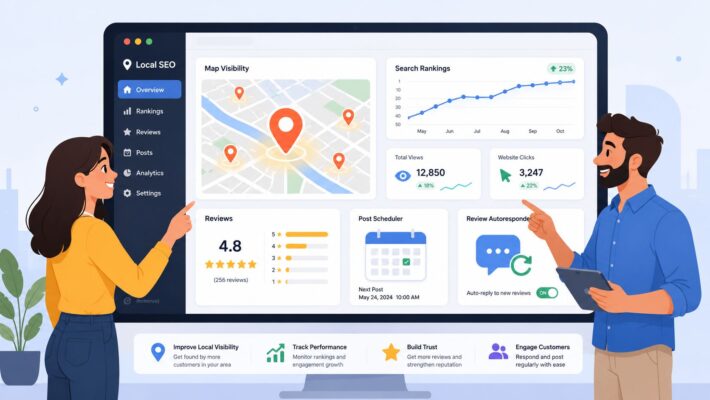
Using a purpose-built Google My Business reporting tool like LocalHQ centralises everything into one place. Instead of the headache of logging in and out of dozens of profiles, you can schedule posts, respond to reviews, and pull performance reports from a single dashboard. You can even visualise your local rank improvements on a map, seeing exactly where your strategy is winning and where competitors still have the upper hand. It turns a complex, time-consuming slog into a streamlined, data-driven operation.
Common Questions About Google Business Profile SEO
Even with a solid plan, you'll always run into specific questions once you're in the thick of optimising your Google Business Profile. Let's tackle some of the most common ones we hear from businesses across the UK, with practical answers to help you get unstuck and keep moving forward.
How Long Does It Actually Take to See Results from a GBP?
This is the big one, isn't it? Everyone wants to know when the magic happens. The honest answer is, it varies. Some small tweaks, like updating your phone number or hours, show up almost immediately. But seeing a real jump in your local search rankings is a marathon, not a sprint.
Generally, if you’ve gone through and properly optimised your profile and you're staying active with posts and reviews, you should start to see some positive movement within a few weeks to three months. The crucial thing here is consistency. A burst of activity followed by radio silence just won't cut it. It’s the steady, ongoing effort that really pays off.
Is It Okay to Add Keywords to My Business Name?
I see this all the time, and it's a very tempting shortcut. You'll spot competitors with names like "Smith's Plumbing – Manchester Emergency Plumber." While it might seem smart, it's a direct violation of Google's guidelines. Your name on your GBP has to be your actual, real-world business name.
Trying to game the system this way can get you penalised or, even worse, get your profile suspended. It’s a huge risk for a very short-term gain. A much better strategy is to weave those valuable keywords into your business description, services, and Google Posts where they belong.
Your business name is for your customers to find you, not for you to stuff with keywords. Build your ranking the right way with quality content and legitimate optimisation – it's the only way to create lasting authority.
What's the Real Difference Between Primary and Secondary Categories?
Think of your primary category as the single most important decision you'll make for your profile. It has the biggest impact on what you rank for. It needs to describe the absolute core of what your business is. If you run a cafe that also sells a few plants, your primary category has to be "Cafe," no question.
Secondary categories are your chance to cast a wider net. For that same cafe, you could add "Plant Nursery" or "Coffee Shop" as secondary options. This gives Google the full picture of what you offer without confusing your main purpose. My advice is to be specific and use every relevant category available to you.
How Often Should I Be Posting on My Profile?
What matters here is a steady rhythm, not just a high volume. Posting ten times in one week and then going silent for a month sends a confusing signal to Google's algorithm. I always recommend aiming for at least one Google Post per week.
This simple habit shows both Google and your potential customers that you're active and engaged. Don't just stick to one type of post, either. Mix it up with Offers, What's New updates, and Events to keep your feed from going stale. A simple content calendar can turn this into a quick 15-minute job each week.
Help! My Profile Was Suspended – What Do I Do Now?
Seeing that suspension notice is heart-stopping, but don't panic. It usually happens for a clear reason, most often a violation of Google's rules. Common culprits include keyword-stuffing your business name, using a P.O. box or virtual office address, or having duplicate profiles for the same location.
First, take a deep breath and carefully read the GBP guidelines to figure out where you went wrong. Fix the problem—for instance, change your business name back to what’s on your sign. Then, you'll need to submit a reinstatement request through your dashboard. Be ready to prove you're a real business; they'll often ask for evidence like a photo of your storefront, a business licence, or a utility bill.
Ready to stop guessing and start dominating local search? LocalHQ provides the AI-powered tools you need to optimise your profile, manage reviews, and track your performance across all your locations from a single dashboard. See how it works.