Local SEO Workflow Automation: Cut 40 Hours to 4
If you're handling local SEO with spreadsheets, inbox rules, calendar reminders, and a vague sense that half your week disappears into repeat admin, you're not alone. The usual pattern is messy: one person updates opening hours, someone else replies to reviews, another exports ranking data on Friday, and nobody fully trusts that every location is saying the same thing everywhere.
That setup breaks faster in 2025. 58% of businesses fail to optimise for local search, only 30% maintain a dedicated local SEO plan, and 40% of local searches on Google displayed an AI Overview by May 2025, which puts even more pressure on keeping local data current and consistent, according to RankMax's local SEO statistics. Local SEO workflow automation fixes that problem when it's built as a system, not a pile of disconnected tools.
The aim isn't to remove people from local SEO. It's to remove the repetitive work that drains judgement, slows response times, and creates avoidable mistakes. The teams that do this well don't automate everything. They automate the predictable parts, keep humans on the strategic decisions, and build workflows that can scale from one site to one hundred.
Mapping Your Manual Local SEO Workflows
Most businesses try to automate too early. They pick a tool before they've mapped the job.
That usually creates a new layer of admin rather than removing the old one. If you want Local SEO workflow automation to work, start by documenting what happens now, in order, with names attached.

Start with one recurring process
Don't map everything at once. Pick one workflow that happens weekly or daily, such as:
- Review handling: A customer leaves a review, someone gets notified, someone drafts a reply, someone approves it, someone posts it.
- Profile updates: Bank holiday hours change, a staff member updates Google Business Profile, then tries to remember the website and directory listings.
- Performance reporting: Rankings are checked, screenshots are taken, metrics are copied into a deck, and the report goes out late.
Write every step in plain language. Include the trigger, the handoff, the tool used, and where delays happen.
A simple whiteboard, Miro board, Notion page, or Lucidchart diagram is enough. If your team needs a broader automation mindset beyond SEO, this guide to mastering AI workflow automation is a useful companion because it shows how process mapping exposes waste before software gets involved.
Mark the friction, not just the steps
A process map becomes useful when you add the points that slow work down or introduce errors.
Use a simple legend:
| Marker | Meaning | Example |
|---|---|---|
| Manual | A person must do it | Copying opening hours into multiple platforms |
| Delay | Work waits in a queue | Review reply sits for approval |
| Risk | A likely error point | Wrong phone number reused from an old sheet |
| Duplicate | The same data is entered twice | NAP details updated in more than one place |
Practical rule: If a task is repeated, rule-based, and low-judgement, it belongs on your shortlist for automation.
Franchise groups and multi-location operators should also map where location data originates. If that source isn't clear, every downstream channel becomes unreliable. A franchise team can use a structured process like this franchise SEO checklist to identify where local data, content, and approvals tend to split apart.
What a finished map should reveal
A good map usually exposes three things quickly:
- Too many handoffs between marketing, operations, and location managers.
- No single source of truth for business data.
- Repeated approval loops for tasks that could be standardised.
Once you can see those points, automation stops being abstract. You know exactly what needs a trigger, what needs a rule, and what still needs a person.
Identifying Your Highest Impact Automation Opportunities
Not every task deserves automation first. Some jobs are annoying but rare. Others happen every day and gradually drain your team.
The best starting point is a simple filter: frequency, effort, and local ranking impact. If a task scores high on all three, automate it before you touch anything more advanced.
Use a prioritisation grid
This quick scoring method works well for local SEO teams:
- High frequency, high effort, high impact: automate first
- High frequency, low impact: automate if it's causing bottlenecks
- Low frequency, high impact: create a checklist, not a full workflow
- Low frequency, low impact: leave it manual
Here's how that looks in practice:
| Task | Frequency | Operational drag | SEO impact | Priority |
|---|---|---|---|---|
| Review monitoring and first-response routing | High | High | High | First |
| Google Business Profile post scheduling | High | Medium | Medium to high | Early |
| NAP consistency checks across locations | Medium to high | High | High | First |
| FAQ and Q&A response drafting | Medium | Medium | Medium | Early |
| Monthly report compilation | Monthly | High | Indirect but important | Early |
| Seasonal opening hours update | Occasional | Medium | High | Checklist plus automation support |
The easiest wins usually sit inside GBP management
For most UK businesses, the first big gain comes from Google Business Profile workflows. That's because the same profile needs frequent attention: posts, review replies, service updates, hours changes, photos, and Q&A responses.
The wider market trend makes this urgent. Workflow automation adoption has passed a tipping point, with more than 65% of global businesses implementing some form of workflow automation by 2025, a 20% increase from two years earlier. Organisations also report 200% return on investment within the first year, and for local SEO specifically, automation has been linked with 23% more organic impressions within 90 days, while properly implemented SEO automation workflows cut labour costs by 35%. Teams also report time savings and lower admin error rates, according to AI Workflow Designer's 2025 workflow automation statistics.
That doesn't mean you should automate every GBP action. It means you should automate the repeatable parts around it.
Good first targets
A strong first wave usually includes:
- Review intake and routing: Send positive reviews into a draft-reply queue and negative reviews to a manager.
- Hours and closure updates: Push approved changes from one source into profiles and internal task lists.
- Post scheduling: Batch one month's worth of GBP content in one sitting.
- Q&A monitoring: Flag new public questions quickly so they don't sit unanswered.
- Reporting assembly: Pull rankings, review trends, and profile engagement into one repeatable report.
If your automation doesn't remove a real bottleneck, it's just software added to an existing problem.
What not to automate first
Some tasks look attractive but tend to disappoint early on:
- Fully automated local landing page copy without review. The risk of duplication and bland content is too high if your template logic isn't solid.
- Auto-publishing every suggested response. Review sentiment is nuanced, especially for healthcare, legal, and hospitality.
- Too many overlapping tools. One platform triggers another, then a third tries to overwrite the same data.
A practical rule is simple. Start where the work is repetitive and the brand risk is low. Leave judgement-heavy work with people until your workflows are stable.
Building Your First Automation Recipes
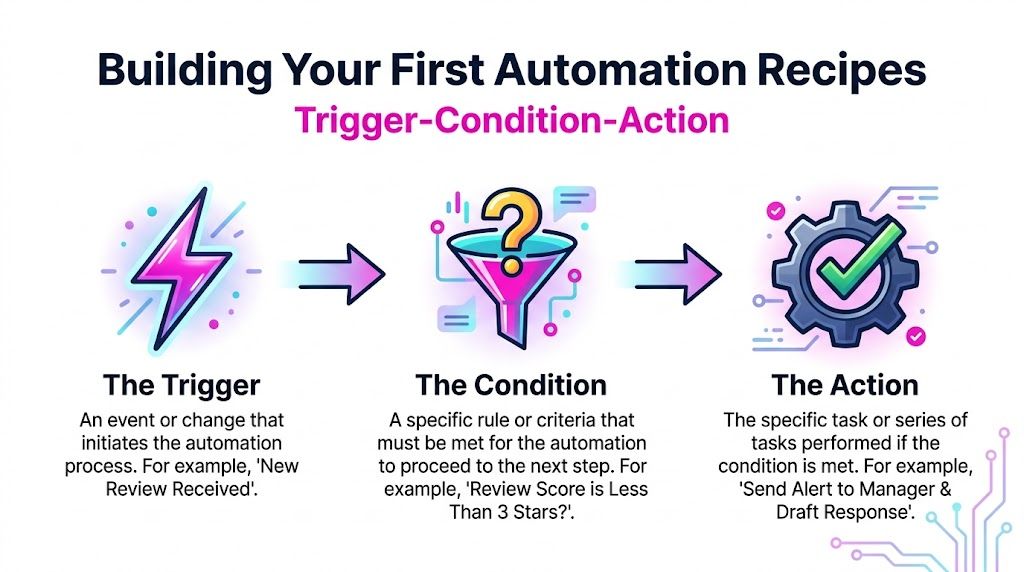
The easiest way to make Local SEO workflow automation usable is to treat each workflow like a recipe. Every recipe has three parts: trigger, condition, action.
That structure keeps workflows readable. It also makes them easier to test, fix, and hand over to someone else.
Recipe one for reviews
Review response workflows are often the best place to begin because the logic is clear and the operational value is immediate.
In UK local SEO, agencies that automate review responses see a 35% uplift in 5-star ratings within three months, driving 28% more calls. Automated systems can also reduce response times from over 24 hours to under 5 minutes, which matters because 78% of UK consumers are more likely to use businesses listed on GBP that actively engage with reviews, according to this UK local SEO automation walkthrough.
Use that without becoming robotic.
Recipe
- Trigger: New Google review received
- Condition: Rating is 4 or 5 stars and review contains no complaint terms
- Action: Draft a reply using brand-approved language, personalise with location name, send for quick approval or auto-publish if confidence rules are met
Reply framework
- Thank the customer by name if available
- Mention the service or visit context if known
- Reinforce locality when relevant
- Invite the next step naturally
Example:
Thanks for your feedback, Sarah. We're glad the team at our Leeds branch could help. We appreciate you taking the time to leave a review and hope to see you again soon.
Recipe two for negative review escalation
Don't auto-publish every response to poor reviews. Route them.
Recipe
- Trigger: New Google review received
- Condition: Rating is 1 to 3 stars
- Action: Notify the location manager, create a response draft, attach customer history if available, set a deadline for human approval
Automation, in this scenario, supports judgement rather than replacing it.
Operational advice: Automate the speed, not the sensitivity.
Recipe three for monthly posting
GBP posting is simple to automate if you separate content creation from publishing.
Recipe
- Trigger: First working day of the month
- Condition: Approved post bank contains at least four ready-to-go items
- Action: Schedule one post per week, assign the right location, attach image, and log publication status
A dedicated scheduler helps here because it removes the need to post one location at a time. If you're planning posts in batches, a tool for scheduling Google Business posts is the operational layer that keeps the workflow tidy.
For teams comparing platforms before building these recipes, Cyndra's overview of Top AI Workflow Automation Tools is useful because it shows which tools are better for orchestration, approvals, or content support rather than pretending one product does everything well.
Recipe four for FAQs and recurring questions
This one is underrated. Local teams answer the same questions constantly.
Recipe
- Trigger: New customer question appears in GBP Q&A or a common question is logged in support
- Condition: Question matches a pre-approved answer category
- Action: Draft a response, insert location-specific details, queue for review
Common answer banks include:
- parking and access
- bank holiday opening times
- appointment rules
- delivery or service area coverage
- accepted payment methods
The recipe works because the structure stays fixed while the local detail changes.
Automating Geo Grid Tracking and Reporting
Once the core workflows are running, the next trap is obvious. Teams save time on execution, then waste it again collecting proof.
Manual reporting is still manual work, even if the underlying SEO actions are automated. The better approach is to connect local rank tracking, review trends, and profile activity into one reporting loop.

Why geo grids matter
A single ranking check doesn't tell you much in local search. One postcode can look strong while the next street over is weak.
Geo grid tracking solves that by checking visibility across a mapped area instead of relying on one location pin. For businesses serving towns, boroughs, or service areas, that view is much closer to reality. It's especially useful for spotting pockets where competitors dominate despite a well-optimised profile.
A practical monitoring setup should include:
- Primary keyword groups: branded, service-led, and "near me" variants
- Location clusters: branch radius, neighbouring postcodes, and high-value commercial zones
- Alert thresholds: notable visibility drops, competitor movement, or sudden gaps in a previously strong area
Turn tracking into action
Reporting only becomes useful when it triggers decisions.
A weekly automated report should combine:
- geo grid movement
- review volume and sentiment trends
- GBP engagement changes
- tasks that need attention, such as a ranking drop tied to stale posts or incomplete profile content
That kind of feedback loop is what keeps automation practical. You're not exporting charts for the sake of it. You're generating a short list of actions for the next working session.
A good local SEO report doesn't say everything. It highlights what changed, why it matters, and who needs to act.
If you want this without spreadsheet stitching, a dedicated local rank tracker gives you the visual layer needed to connect visibility shifts to actual locations. That's far more useful than a flat ranking list when you're managing a dense service area or several branches.
Keep the report lean
Most automated reports are too long because nobody removed the vanity metrics.
A strong local report should answer four questions:
- Where did visibility improve or drop?
- Which locations need action first?
- Did reviews and profile activity support that movement?
- What should the team do next week?
If the report can't answer those clearly, shorten it.
Scaling Automation Across Multiple Locations
Single-location automation is helpful. Multi-location automation is where the model becomes essential.
Once a business has several branches, every manual process starts to multiply. One opening-hours change becomes ten updates. One campaign becomes fifty post variations. One data inconsistency becomes a network-wide trust problem.

Central control with local flexibility
The strongest setup uses one central source for business facts, with controlled fields for local variation.
That means:
- headquarters controls brand rules, service naming, and approved messaging
- location teams can adjust branch-specific details such as temporary closures, local offers, or area-specific updates
- workflows push changes outward in a controlled sequence rather than relying on branch-by-branch editing
This matters even more with AI Overview visibility changing how local information is surfaced. If your business details are inconsistent across profiles, pages, and directories, scaling manually becomes risky.
One of the biggest gaps in the market is GBP data harmonisation for UK multi-location businesses, especially where teams still sync information manually across GBP, websites, and local directories. The operational pain is obvious in practice: the more branches you manage, the more likely inconsistent data, delayed updates, and duplicated effort become. That is why a central platform approach beats ad hoc spreadsheets every time.
Programmatic pages are part of the workflow
Multi-location SEO isn't only about profile management. It also needs location pages that can scale without becoming thin or repetitive.
For UK multi-location businesses, automating local landing page creation can produce a 52% traffic increase compared with manual methods, and 67% of new pages rank in the local pack within 90 days for competitive service sectors when templated content and automated schema insertion are handled properly, according to SEOmatic's guide to automating local SEO.
That doesn't mean pressing a button and publishing hundreds of near-identical pages. It means building a structured system with:
- location-specific service mappings
- schema pulled from verified branch data
- reusable blocks for trust signals, local proof, and FAQs
- editorial review for pages in sensitive or highly competitive areas
Why centralised systems win
A decentralised setup sounds flexible, but usually creates chaos. Different branches write in different tones, opening hours drift, and local pages are built to different standards.
A centralised model works better because it gives you:
- Consistency: one source of truth for NAP, services, and brand language
- Controlled delegation: branch teams can update what they should, not everything
- Scalability: adding a new location becomes a workflow, not a fresh project
- Auditability: you can see who changed what and when
For larger brands, franchise groups, and agencies running dozens of profiles, an enterprise local SEO platform becomes less of a convenience and more of an operating requirement.
Common Pitfalls And How To Avoid Them
The biggest myth in Local SEO workflow automation is that once the workflows are live, the work is done. It isn't. Automated systems need supervision, testing, and regular refinement.
The most common failure is over-automation. Generic replies, weak templates, and poor approval rules make the business sound careless.
Where automation goes wrong
One documented risk is automated review handling without human oversight. Generic replies can be penalised by Google's E-E-A-T expectations, and in some observed cases that has led to a 15% ranking drop for the affected business profile. That's the practical warning raised in the earlier UK automation evidence.
Problems usually appear in a few places:
- Template fatigue: every review gets the same phrasing
- Bad branching logic: complaints are treated like praise
- Conflicting tools: one system updates data while another overwrites it
- No exception handling: unusual cases have nowhere to go except public embarrassment
A safer operating model
Use a light governance layer around every important workflow.
Before launch
- Test with sample inputs: positive review, negative review, star-only review, wrong-location review
- Check brand tone: read the output aloud. If it sounds like software, rewrite it.
- Create rollback steps: know how to pause publishing, remove drafts, or revert updates fast
After launch
- Review outputs weekly: not just performance, but quality
- Refresh templates regularly: especially for review responses and post copy
- Escalate edge cases: healthcare, legal, complaints, safeguarding, refund disputes
Human oversight isn't the opposite of automation. It's the quality-control layer that keeps automation useful.
Keep people where judgement matters
The strongest teams don't ask, "Can this be automated?" They ask, "Should this be automated fully, partially, or not at all?"
That's the right frame. Use automation for speed, consistency, and admin control. Keep people on reputation management, editorial review, and any decision that affects trust.
Your New Reality From 40 Hours to 4
When Local SEO workflow automation is built properly, the work changes shape. The week stops being a string of repetitive tasks and becomes a short operational review followed by strategic decisions.
Instead of manually checking reviews, posting one profile at a time, chasing location managers for updates, and stitching reports together, you spend your time reviewing exceptions, spotting local opportunities, and improving what already runs. That's the shift that matters. Less admin. Better control.
The strongest systems usually share the same traits:
- one source of truth for location data
- a few well-tested recipes for repeat tasks
- reporting that highlights action, not noise
- human approval where brand or reputation is on the line
If you still spend most of your week inside spreadsheets and tabs, the issue usually isn't effort. It's workflow design.
A cleaner reporting process is often the final piece because it shows whether all the automation is helping. If you want that operational visibility, SEO reports for customers is the kind of reporting layer that turns local SEO activity into something you can review quickly and act on confidently.
If you're ready to stop firefighting local SEO tasks and start running them as a system, explore LocalHQ. Its strongest fit for this workflow is turning review management, profile updates, geo-grid tracking, and reporting into one connected process so your team can spend less time on admin and more time growing visibility.