Keyword Rankings Report: A Local SEO Guide for 2026
A lot of businesses get the same kind of SEO report every month. A list of keywords. A few green arrows. A claim that visibility is improving. Then the owner looks at bookings, calls, walk-ins, or quote requests and asks a fair question: why doesn't this feel like progress?
That gap usually comes from the report, not the work. A national average ranking can look fine on paper and still tell you almost nothing about what people in Leeds, Bristol, Croydon, or a specific postcode saw when they searched. If the report ignores local pack visibility, device differences, and street-level variation, it's not helping anyone make decisions.
A useful keyword rankings report for a UK business should answer practical questions. Where are we visible? Where are we weak? Which terms are close to page one? Which locations are underperforming? And what should we change next month because of what the data shows?
Beyond National Ranks Why Local SEO Needs a Different Report
A generic rankings report often treats search like one flat national market. That's fine for some broad campaigns. It's a poor fit for a solicitor targeting specific boroughs, a dentist serving a few neighbouring towns, or a roofer who only wants jobs in a tight service radius.
The problem is simple. Local customers don't search in a vacuum. Google changes results based on location, device, and whether the query triggers a local pack. A business can “rank well” in an averaged national report and still be nearly invisible where the actual customer is searching.
What national averages hide
Many reports still flatten everything into one ranking line. That makes the numbers neat, but it hides the operational reality of local search. A term may perform well in one city and poorly in another. Branded queries may be doing all the heavy lifting while non-branded service terms lag behind. Averages smooth over both problems.
Google Search Console supports filtering by country, and local SEO practice increasingly requires separating branded from non-branded and national from local intent to avoid misleading averages, especially because UK local search is shaped so heavily by nearby intent and mobile usage, as noted in this guide to mastering keyword ranking reports.
Practical rule: If a local business serves a place, the report should show that place. If it doesn't, the report is too broad.
That applies before you even get to more granular analysis. If you haven't done the work to find high-intent local keywords, your report usually ends up full of phrases that look impressive but don't connect cleanly to service areas or buying intent.
What a local-first report should show
A local-first keyword rankings report needs to answer different questions from a national SEO dashboard. At minimum, it should separate:
- Branded and non-branded terms so you can tell whether demand is coming from existing awareness or new discovery
- National and local intent so broad phrases don't distort local performance
- Organic listings and map-pack visibility because those are different surfaces with different drivers
- Location clusters such as city, county, postcode area, or service radius
For that kind of reporting, a specialist local rank tracker is more useful than a broad visibility score. LocalHQ's rank tracking tool is one example of a platform built around place-based tracking rather than a single national average.
A local business doesn't need more rows in a spreadsheet. It needs a report that reflects how customers search nearby.
Laying the Foundation for a Meaningful Report
The report gets better the moment you stop asking, “What are our rankings?” and start asking, “What are we trying to achieve in a defined area?” Rank tracking without a business goal produces noise. Rank tracking tied to local objectives produces a usable shortlist of actions.
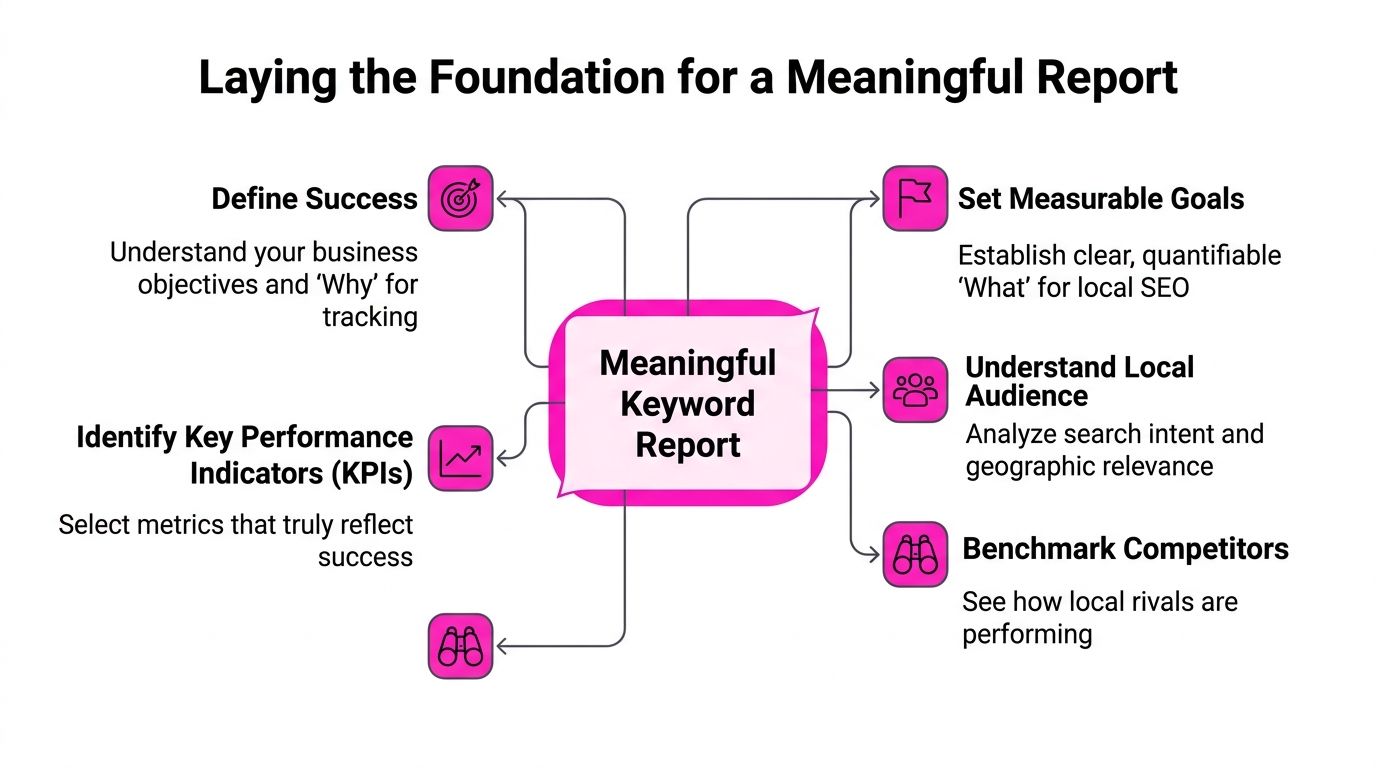
Start with outcomes, not keyword lists
For a single-location business, that might mean stronger visibility for core services in the surrounding area. For a multi-location brand, it might mean knowing which branches are discoverable for non-branded searches and which are relying almost entirely on name recognition.
I usually push stakeholders to define success in language the business already uses. More calls from a target town. Better visibility for a service line in a priority catchment. More map-pack presence for high-intent local searches. Those are reporting goals people can understand.
A simple starting framework works well:
| Focus area | What to define |
|---|---|
| Business objective | Which service, location, or branch matters most |
| Search intent | Whether the query is branded, discovery-led, or urgent/local |
| Reporting level | Branch, town, county, postcode area, or national UK view |
| Decision use | What action the team will take if the metric changes |
Build a keyword set that reflects local demand
Many reports go off course; teams either track too few keywords, or they track broad vanity terms that don't align with service delivery. In UK search, that's a mistake because keyword demand is so fragmented.
Ahrefs' 2026 SEO statistics report says 94.74% of keywords receive 10 monthly searches or fewer, which is why local reporting needs to track many low-volume terms rather than hoping a few head terms will explain performance, according to Ahrefs' SEO statistics.
That has a direct reporting implication. For local SEO, a useful keyword set often includes:
- Branded searches that show demand for the business name and known brand variants
- Core service terms such as emergency plumber, family solicitor, MOT centre
- Service-in-location phrases that tie the service to a town or district
- Near me style intent where proximity and local pack visibility matter more than a plain blue-link ranking
- Neighbouring-area variations that reveal whether visibility drops outside the immediate base
A small movement on a low-volume, high-intent local term can matter more than a broad ranking gain on a phrase that never converts into enquiries.
If you manage reporting at scale, especially across lots of pages or locations, it helps to borrow some process thinking from larger programmes. The operational side of grouping keywords, setting ownership, and standardising views is covered well in this piece on mastering enterprise rank tracking.
Keep the list disciplined
A keyword list should be broad enough to reflect real demand, but not so bloated that nobody can review it properly. Good reports tend to group terms by service, intent, and location. Poor reports dump every tracked phrase into one giant table and call it insight.
Use categories people can act on. If the content team owns service pages, group by service. If branch managers care about towns and postcode areas, group by geography. The best structure is the one that makes the next action obvious.
Collecting Accurate Geo-Targeted Rank Data
If the data collection is sloppy, the rest of the report is theatre. Local SEO needs cleaner inputs than general SEO because rankings vary so much by place and search context.
Google Search Console is the usual baseline. It's useful because it shows real search performance, and for UK reporting it can be filtered to country-level query data. That helps stop global impressions from muddying the picture. But Search Console doesn't tell the whole local story on its own.
Search Console versus rank tracking tools
Here's the practical distinction:
| Data source | What it does well | Where it falls short |
|---|---|---|
| Google Search Console | Shows impressions, clicks, CTR, and average position from real searches | Country filtering is useful, but it doesn't give a proper street-level local grid |
| Standard rank trackers | Track defined keywords over time | A single location setting can still flatten local variation |
| Geo-grid tools | Show ranking differences across multiple points in a target area | Need careful setup and interpretation |
Search Console helps you see demand and trend. A local rank tracker helps you see placement. You need both if the business cares about actual local visibility rather than abstract ranking movement.
Why geo-grid data changes the conversation
A geo-grid shows how visibility shifts across an area by checking rankings from multiple points within a town, city, or service radius. That matters because a business may be strong close to its physical location and weak only a short distance away. A single average ranking won't show that.
For local businesses, that's often the missing piece. If you only track one pin dropped in a city centre, you can't see whether the business disappears in outer districts, commuter belts, or key postcode areas. Geo-grid reporting makes those blind spots visible.
This kind of setup also helps separate two very different opportunities:
- Traditional organic visibility, where the website page ranks in search
- Local pack or Maps visibility, where the Google Business Profile appears prominently for nearby intent
Those can move together, but they don't always. A weak map-pack presence can coexist with decent organic rankings, and vice versa.
Get the settings right before you trust the data
For UK geo-targeted rank tracking, the methodology must explicitly set location, device type, and local map-pack context. Position tracking tools can be configured by country and device, and it's recommended to tag keywords by location and add campaign notes to attribute rank shifts to specific site changes, as explained in Weidert's guide to monitoring keyword rankings.
That advice sounds basic, but it prevents a lot of bad reporting. If you don't lock down those variables, you end up trying to explain movement that may just be measurement noise.
A few setup rules are worth sticking to:
- Track mobile and desktop separately because local behaviour often differs by device
- Label keyword groups by town or service area so the report can be filtered quickly
- Record campaign notes when pages are updated, links are added, or profiles change
- Watch local pack context instead of treating all rank movement as standard organic change
If you want a clearer walkthrough of local-focused setup logic, LocalHQ's essential rank tracking guide is a useful reference.
From Vanity Metrics to Valuable Business Insights
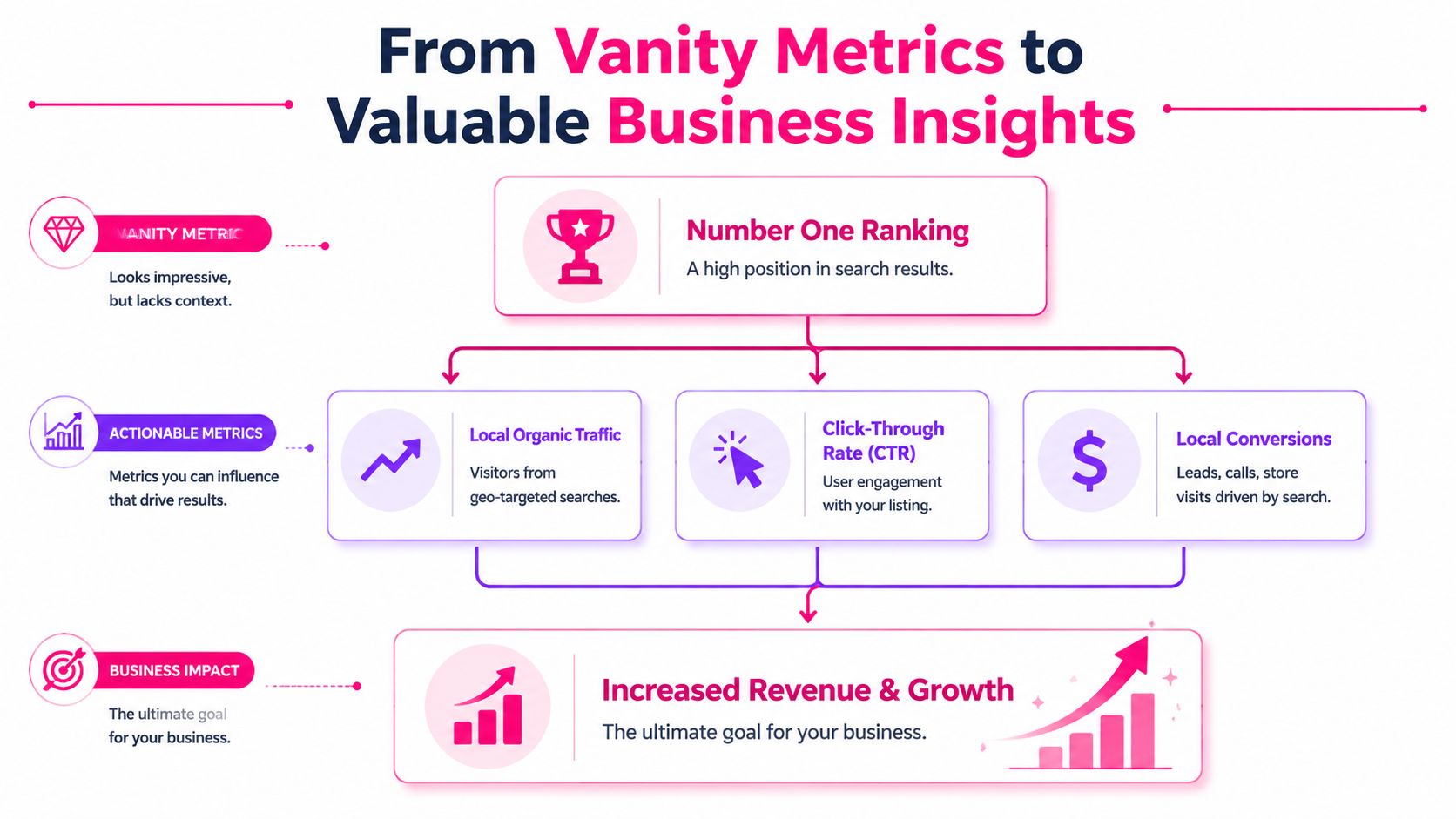
A rankings report becomes useful when it stops chasing bragging rights. “We're number one” isn't a business outcome. It's only meaningful if it leads to more qualified visits, more calls, more direction requests, or more booked work.
Too many reports still centre the headline around ranking position alone. That creates the wrong conversation. Stakeholders start debating whether a move from one position to another is good enough, when the key question is whether search visibility produced meaningful engagement.
Why position on its own is unreliable
A keyword rankings report shouldn't be judged on position alone, because SERP features can suppress organic clicks even when rankings improve. Google Search Console separates impressions, clicks, CTR, and average position, which helps expose that mismatch. This matters for UK businesses in particular because the Office for National Statistics reports that 94% of UK adults used the internet daily in 2024, reinforcing how important mobile-first and local intent have become, as discussed in this search engine ranking report guide.
This is often the situation with many “good” reports that don't feel good to clients. They show ranking gains, but the click behaviour changed because a local pack, snippet, or another SERP feature took more of the visual attention.
Better visibility doesn't always mean better traffic. Sometimes it means your listing is being seen in a different way, on a different surface, with a different click pattern.
The metrics that tell a fuller story
A stronger report balances visibility data with engagement and outcome data. I'd usually review the metrics in layers:
Visibility layer
Average position, ranking trend, and impressions show whether the business is appearing more often and in better positions.Engagement layer
Clicks and CTR show whether searchers choose the listing once they see it.Business outcome layer
Website visits from local landing pages, phone enquiries, direction requests, and other local actions show whether visibility is turning into commercial value.
That layered view changes the interpretation. A keyword may stay in roughly the same position while impressions rise, CTR softens, and business actions still improve. That isn't failure. It means the query environment and result format are shifting, and the report needs to explain that clearly.
Explain the why, not just the movement
This is where commentary matters. A report should never just say a keyword improved or declined. It should say what likely changed and what the team should do next.
For example:
| Scenario | What it may mean | What to check |
|---|---|---|
| Higher average position, fewer clicks | SERP features reduced organic click share | Review the live results page and title copy |
| More impressions, flat CTR | Broader exposure but weak relevance or weaker snippet appeal | Tighten page titles and local intent matching |
| Strong map visibility, weak website traffic | Profile is winning attention, site journey may be poor | Check landing page alignment and calls to action |
For agencies and internal teams that need to present those insights cleanly, LocalHQ shares SEO reporting strategies that focus on explaining business impact rather than dumping raw rank tables.
Designing and Automating a Report People Will Use
A useful report isn't the same as a complete report. Most stakeholders won't read every tab, chart, and export. They'll scan the top, look for movement, and decide within seconds whether the report tells them what matters.
That means layout matters as much as data quality. If the report buries the key changes, nobody uses it properly. If it surfaces the right metrics in the right order, people act on it.
Build the report in layers
The most reliable structure is a short executive view first, then detail underneath for the people who need it.
A solid keyword rankings report usually includes:
Executive summary
A plain-English view of what improved, what declined, and what needs attention.Trend section
Month-by-month changes in visibility, clicks, and core keyword groups.Local segmentation
Breakdowns by location cluster, branch, or service area.Keyword detail
The working table for SEO teams, with enough depth to diagnose issues.
For foundational reporting, the most useful fields are the keyword, estimated search volume, average position, and month-by-month trend, which makes it easier to compare branded, generic, and topic-clustered terms for regional UK decisions, as outlined in this reporting walkthrough.
Match the chart to the question
A lot of reporting friction comes from using the wrong visual. Keep it simple.
- Line charts work for ranking and visibility trends over time
- Bar charts are useful for month-on-month comparison of clicks or impressions
- Tables with filters help the SEO team isolate branded, non-branded, and location-tagged terms
- Geo-grid views work best when you need to show on-the-ground variation quickly
A report that answers one question per chart gets used. A report that tries to answer ten questions per chart gets ignored.
Automate the mechanics, not the thinking
Looker Studio is fine for custom dashboards if you're comfortable with connectors and upkeep. Spreadsheet-led reporting can work for small teams. But both tend to become fragile once you add multiple locations, local pack tracking, annotations, and client-facing delivery.
That's where dedicated reporting platforms help. Local SEO software can pull rank data, Search Console signals, and location-based views into one system, then schedule delivery without someone rebuilding the same document every month. Local SEO analytics is the kind of setup that makes this easier when the reporting needs to stay local-first.
Automation should handle collection, visualisation, and recurring delivery. Human review should handle the interpretation. When teams confuse those jobs, they either automate junk or spend hours formatting numbers nobody learns from.
Turning Your Keyword Report into an Action Plan
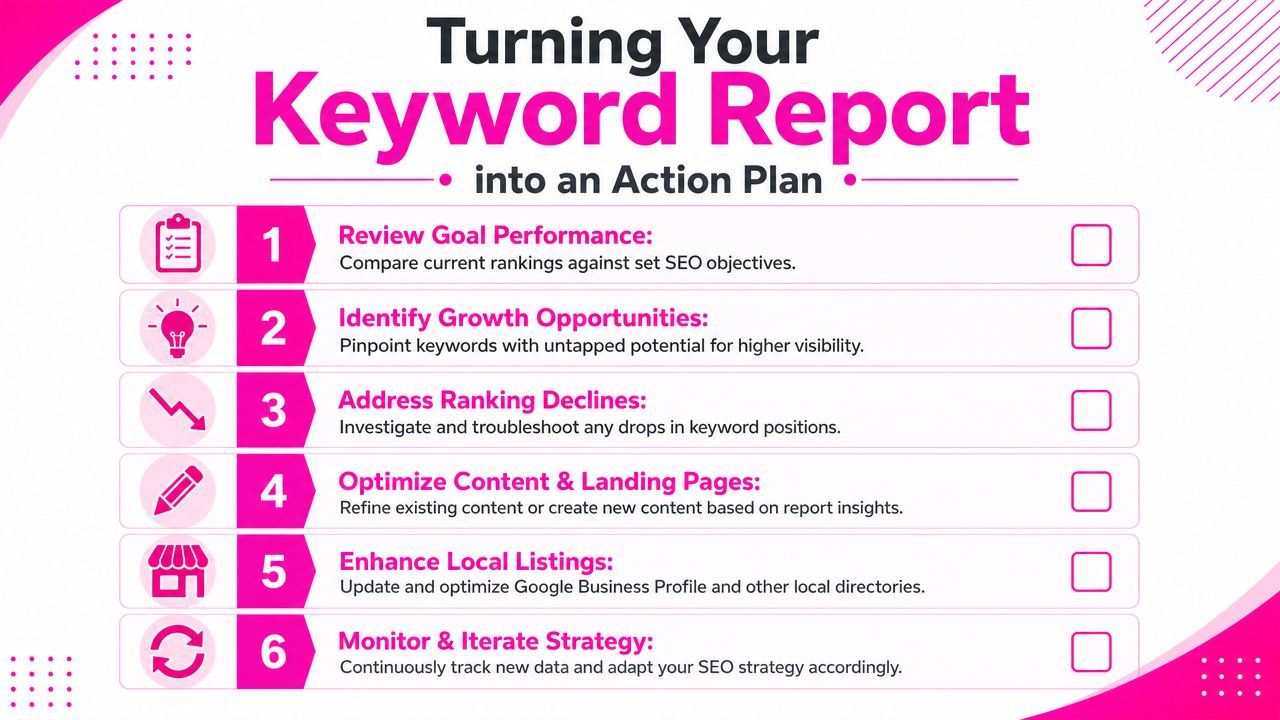
A report earns its keep when it tells the team what to do next. That sounds obvious, but plenty of keyword rankings reports stop at observation. They identify movement without setting priorities.
The most practical way to turn reporting into action is to sort opportunities by ease, intent, and local relevance. Not every drop needs a fire drill. Not every gain needs celebrating. Some changes just need the right follow-up.
Start with the keywords closest to a breakthrough
A practical UK keyword rankings report should segment queries and prioritise those in the 11–20 position band because these terms already generate impressions and can move onto page one with smaller changes such as internal linking and content updates, according to this Looker Studio keyword ranking guide.
That's often the most effective part of the report. Those terms are already in contention. They don't usually need a complete rebuild. They need a push.
Good follow-up actions include:
- Strengthen internal linking from related pages with clear local context
- Refresh copy on existing landing pages so the page better matches intent
- Tighten title tags and headings where the query fit is weak
- Expand local relevance with service-area detail, FAQs, or location-specific proof points
Diagnose declines by location, not just by keyword
If rankings dip in one part of the service area, treat that as a local visibility issue before you treat it as a whole-site issue. Check whether competitors have become more prominent in the local pack, whether the landing page is too generic for that area, or whether the business profile is weaker there in practical terms.
A simple review workflow helps:
| Report finding | Likely next step |
|---|---|
| Strong in one town, weak in another nearby | Review local landing page relevance and supporting signals |
| Branded terms stable, non-branded terms weak | Improve discovery content and service-page targeting |
| Organic stronger than Maps | Work on profile completeness and local entity signals |
| Maps stronger than organic | Improve landing page quality and local page depth |
Turn commentary into work tickets
Most reporting falters when comments are vague, leading to an equally vague action list. A better approach is to write commentary in a way that can become a task immediately.
For example:
- Keyword group improved but remains just off page one. Add internal links from related service pages and refresh on-page copy.
- Visibility dropped in a target area. Review live SERPs there and compare local pack competitors.
- Map visibility is healthy, but local landing page engagement is weak. Improve page relevance and conversion paths.
If you need a faster route to location-specific page improvements, a structured local landing pages SEO template can help turn ranking opportunities into publishable work.
If your current report tells you where rankings moved but not what to do next, it's time to rebuild the process around local visibility, map-pack context, and real business actions. LocalHQ gives teams one place to track local rankings, monitor performance across target areas, and turn reporting into practical SEO decisions.