



What should you do when AI gets your business details wrong?
Save the incorrect answer, confirm the correct business fact, then check the source behind the claim. Correct information you control, request changes from other source owners and verify the public result. Retest the AI answer separately. A saved edit, an accepted listing change and a corrected AI response are three different events.
There is no single business-information record you can edit to correct every AI assistant. Treat an error as a traceable incident rather than trying dozens of prompts until one gives the answer you want.
This guide is for a local business, agency or multi-location team dealing with a specific factual error: the wrong telephone number, opening time, branch, address or service. Use the free CSV incident worksheet or the plain-text worksheet to record the work. These are editorial resources, not LocalHQ product exports.
Capture one fact before you change anything
Start with the detail a customer could act on. “The answer is poor” is hard to investigate. “The answer gives the Bath branch number for the Bristol branch” gives the team something to verify.
- Save the observation: the exact answer excerpt, question, follow-up context, engine or search surface, date and time, and any location settings you can verify.
- Save the evidence: an appropriate screenshot or answer reference, plus the cited URLs. Remove unrelated personal information before sharing it.
- Confirm the fact: ask the person responsible for that branch, service or opening schedule. Record their evidence and its date.
- Set the priority: address errors that misdirect calls, visits or bookings before polishing vague descriptions.
Use one worksheet row per disputed fact and branch. If an answer gives the wrong number and the wrong hours, separate them: each may have a different source and correction owner. A claim about a service you do not offer needs confirmation, not a new service page created simply to satisfy the answer.
Keep factual accuracy separate from discovery. An accurate answer that does not recommend your business is a different problem. The local AI visibility metrics guide explains how to distinguish mentions, citations and other observations.
Is the error in the source or in the answer?
Open the actual cited page. Check the passage about the disputed fact and the location it describes. A citation beside a sentence does not establish that the page supports every detail in that sentence.
OpenAI’s search guidance says results and citations can be incomplete, outdated or incorrect, and recommends checking the source. Use that as a verification step, not a reason to assume every error came from your website.
| What you find | Useful next action | Proof to retain |
|---|---|---|
| Your own page contains the wrong fact. | Ask its owner to correct the relevant visible information and any matching structured data. | The live URL, corrected passage and public verification date. |
| A directory or publisher contains an old detail. | Use its edit or correction process. Supply the exact branch, incorrect passage and confirmed replacement. | The request reference and, later, the published correction. |
| Google Business Profile itself is wrong. | Have the authorised manager edit the correct profile and check the edit’s status. | The profile identity, submitted change, status and public result. |
| The cited source is correct but the answer is wrong. | Keep the evidence. Investigate other visible sources and use available feedback options where appropriate. | Both the accurate source passage and the inaccurate answer. |
| The answer combines two branches or similar businesses. | Compare branch-specific names, addresses, numbers and URLs. Correct the specific mismatch you can substantiate. | A fact record for each entity; avoid merging their details. |
| No source explains the claim. | Mark the cause as unknown. Check your key public sources and retain the incident for a later retest. | The answer, checks completed and limits of the investigation. |
This table is a practical LocalHQ editorial method. It does not identify an assistant’s hidden data sources. A source linked in an answer is useful evidence to inspect, not proof of the entire process that produced the response.
Make the smallest supported correction
If the website is wrong
Correct the existing page where people need the information. For a branch-specific fact, check that branch’s location page, contact route and relevant service details. If visible hours and structured data disagree, have the developer align them with the confirmed schedule. Preserve useful URLs; an incorrect closing time does not call for a new domain or a new set of near-identical pages.
For a changed page you manage, an authorised Search Console owner or full user can request indexing through URL Inspection. Google’s recrawl documentation makes clear that a request does not guarantee immediate inclusion, and repeated requests do not speed crawling. It is not a request to refresh every AI platform.
If Google Business Profile is wrong
Sign in with the Google Account linked to the correct profile, choose Edit profile, change the relevant detail and save. Check Google’s current editing instructions if your interface or access differs. Avoid creating a duplicate listing as a shortcut.
Google reviews changes. Its edit-status guidance distinguishes accepted, pending and not-approved edits. Record the actual status and check the public profile; submission alone is not completion. An accepted profile edit also does not prove a separate AI answer has changed.
If a third party is wrong
Send a precise request: the page URL, business and branch, incorrect fact, confirmed replacement and supporting public evidence. Use the publisher’s own process. Keep the request open until the public page is checked, or record that it is blocked. A directory correction is related to local citation maintenance, but an AI incident also needs a separate answer check.
If all checked sources are correct
Do not alter accurate business details to match an unsupported answer. Retain the discrepancy and the sources you checked. If the platform offers relevant feedback, describe the exact error with evidence. Feedback is a request for investigation, not a guaranteed correction or a substitute for fixing a source you know is wrong.
Verify the source and the AI answer separately
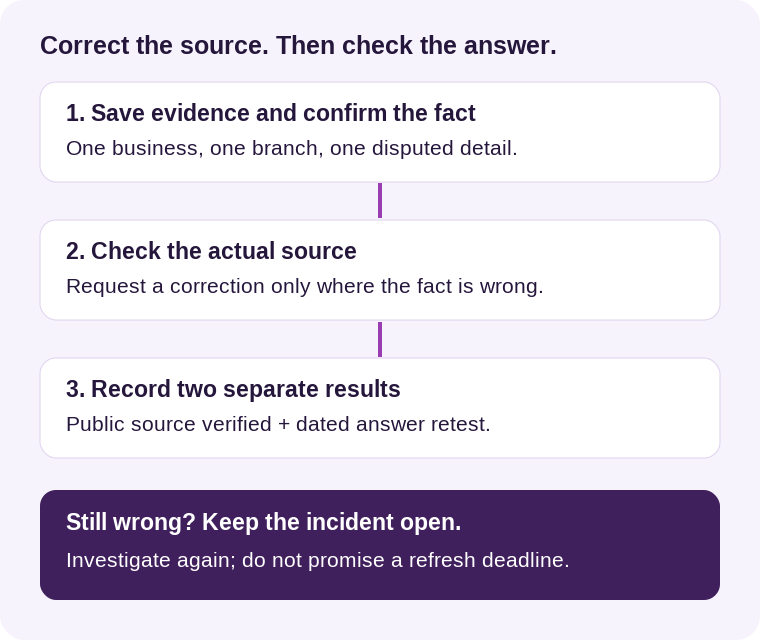
First, verify the public source. Open the relevant page or profile and check the exact fact. Record what is visible and when. If approval is pending, keep that dependency explicit.
Then repeat the factual question. Use the recorded wording, engine, search mode and location context as closely as available controls allow. Start a fresh conversation for this check; separately retain any follow-up used to diagnose the original answer. Record changes in conditions rather than treating unlike answers as a clean comparison.
For investigation, you can ask the assistant to check a specified authoritative URL. Label this a source-directed diagnostic check. It answers a different question from whether an ordinary customer prompt now returns the correct information.
Use two status fields
Source: unchecked · correction requested · pending review · published and verified · rejected or blocked.
Answer: not retested · correct in the recorded retest · still incorrect · no answer or access unavailable.
“Source verified; answer still incorrect” is a useful result. It shows what is complete and what remains unresolved.
Choose a next review date based on customer risk and the source’s actual response. There is no universal waiting period after which every assistant must show your new details. One correct retest is a dated observation, not evidence that all future answers, users or platforms will be correct.
Use the incident worksheet to keep ownership clear
The download gives you a repeatable record without requiring a new reporting system. Use the CSV worksheet in your spreadsheet, or copy the plain-text version into a task. Keep detailed evidence in an access-controlled location and reference it from the record.
| Field group | What to record |
|---|---|
| Identity and claim | Incident ID, business, branch, disputed fact and exact answer excerpt. |
| Observation conditions | Engine/surface, mode, prompt and context, location, date and evidence reference. |
| Source and confirmation | Cited URL or “none”, checked passage, confirmed fact and dated supporting evidence. |
| Responsibility | Customer risk, fact owner, correction owner, request date and outstanding dependency. |
| Verification | Source status, public verification date, answer retest conditions and observed result. |
| Follow-up | Next review date, limitations and what remains unresolved. |
For agencies, distinguish the person who confirms a fact from the person who requests the correction. A branch manager may approve hours; the agency may update the website; a directory may control publication. For several locations, use one incident ID per branch and fact so a correct head-office number cannot accidentally overwrite a branch number.
Bring unresolved incidents into your AI search client report and action register with their evidence and dependencies. Keep the incident worksheet for diagnosis; use the reporting template for the wider client decision.
A worked example: the wrong closing time
Hypothetical example: the business, hours and sequence below are invented to demonstrate the method. They are not a LocalHQ test or customer result.
An agency saves an AI search answer saying that fictional Example Repairs, Bristol closes at 17:00 on Fridays. The branch manager confirms that the current Friday closing time is 18:00. The website and Google Business Profile show 18:00, but a directory linked in the answer still shows 17:00.
- Record the incident: save the question, answer, linked directory and the manager’s dated confirmation. Identify the Bristol branch explicitly.
- Assign the correction: ask the directory owner to replace the Friday hours, linking to the correct branch page. Leave the already accurate website and profile alone.
- Verify publication: when the directory changes, record the public passage and check date. Close the source task, not the whole incident.
- Retest: repeat the original factual question under recorded conditions. If 17:00 still appears, keep the answer status unresolved and investigate again. If 18:00 appears, record that specific result.
A useful update would read: “The directory now shows the confirmed Friday hours. The answer has not yet been retested.” That is more actionable than “AI fixed”, which hides the missing check. If a retest becomes correct, describe the sequence without claiming the directory edit caused the change.
Questions about correcting AI business information
Can I correct ChatGPT by telling it the right answer?
You can supply a correction or ask it to check an authoritative source in your conversation. Do not treat the resulting reply as proof that future customers will see the correction. Fix public sources where necessary and record a separate fresh factual check.
Should I change my Google Business Profile if it is already correct?
No change is justified solely because another platform gave a wrong answer. Check the exact branch and disputed fact first. Edit the profile if it is wrong, then verify the status and public result.
Do I need special AEO or GEO schema?
Google’s AI features guidance does not require special AI schema or extra technical measures beyond its existing search requirements. Keep structured data consistent with visible facts. A new markup block is not a way to guarantee that an answer will be corrected.
What if I cannot identify the source?
Record that limitation. Check the key public pages and profiles, preserve the answer and choose a review date. Do not turn an unknown cause into a confident claim about which database or model needs changing.
Sources and your next step
The decision table, correction method and worksheets are original LocalHQ editorial resources. Primary documentation was checked on 20 November 2026; interfaces and processes can change.
- OpenAI: searching the web with ChatGPT — sources, accuracy checks and location context.
- Google: edit your Business Profile — authorised editing of business details.
- Google: understand Business Profile edits — review and edit statuses.
- Google: request a recrawl — access requirements and limits.
- Google: AI features and your website — existing SEO foundations and structured data guidance.
Choose one incorrect fact, confirm it with the responsible person and complete the first worksheet record. Use the AI Search Hub for broader guidance. For ongoing profile maintenance, explore LocalHQ’s Profile Manager; for a wider starting point, explore the AI Visibility Audit. Neither replaces checking the underlying source and the observed answer.